
Build a Flawless Data Extraction Table for Receipts and Transactions
Learn to design a robust data extraction table for financial data. Master schema design, validation, and accounting integration for total automation.
A well-designed data extraction table is the engine room of any reliable financial automation system. It acts as the single source of truth, taking all the messy, unstructured information from receipts and invoices and turning it into clean, organised data that’s actually ready for processing. At Mintline, we've built our entire platform around this concept, ensuring every transaction is captured flawlessly from the start.
Why a Data Extraction Table Is So Crucial
Think of this table as the central nervous system for your financial data. It isn't just a place to dump information; it’s the structured foundation that determines the quality, speed, and accuracy of your entire accounting workflow. Without it, you’re just juggling disconnected data points, which inevitably leads to painful manual reconciliation and costly errors.
Platforms like Mintline rely on a solid table structure to automatically transform chaotic documents into actionable financial insights. This structured approach is what makes real automation possible, taking you beyond basic data capture and into the realm of intelligent processing. The payoff is immediate and significant:
- Wipe Out Manual Errors: By standardising how data is captured and stored, you get rid of the guesswork and typos that plague manual data entry.
- Establish a Single Source of Truth: All your financial information is organised in one spot, creating a crystal-clear, auditable trail from the original document right through to the final report.
- Power Seamless Integrations: A well-defined table maps easily to accounting software like Xero or QuickBooks, letting you push clean data directly into your general ledger without a fuss.
The Bedrock of Intelligent Automation
To really get why this table matters so much, it helps to see it within the bigger picture of the benefits of automation in business. This organised approach is the backbone for more advanced technologies. If you want to dive deeper, you can learn more about how this works in our guide on intelligent document processing, which explains how raw data gets turned into something truly usable.
The impact here is huge. For instance, the Netherlands Alternative Data Market, which leans heavily on these methods, is expected to balloon from USD 93.40 million in 2024 to a staggering USD 1,412.49 million by 2031. This explosive growth is fuelled by sectors using tables to make sense of raw data—think of logistics firms in Rotterdam improving their forecast accuracy by 28%.
A data extraction table does more than just hold information; it imposes order on financial chaos. It's the critical first step that separates a frustrating, manual accounting process from a fluid, automated workflow.
This initial setup, which you can see in platforms like Mintline, is all about methodically capturing and structuring every critical piece of information from the get-go. By building this strong foundation, you guarantee that every step that follows—from validation to reporting—is built on reliable, accurate data.
Designing a Scalable Transaction Data Schema
Building a powerful data extraction table is all about the architectural work you do upfront. Think of it less like filling in a spreadsheet and more like creating a blueprint for turning messy receipts into clean, reliable financial data. This schema is the very foundation that dictates how information is captured, checked for accuracy, and ultimately put to work.
A well-designed schema isn’t just about what you need today. It's about anticipating what you’ll need tomorrow, whether that’s breaking down transactions by line item or handling multiple currencies. It’s what makes the difference between a system that breaks under pressure and one that scales with your business. The goal is to impose a clear structure on otherwise chaotic, unstructured information.
This whole process is about creating order from chaos, with your extraction table acting as the critical bridge.
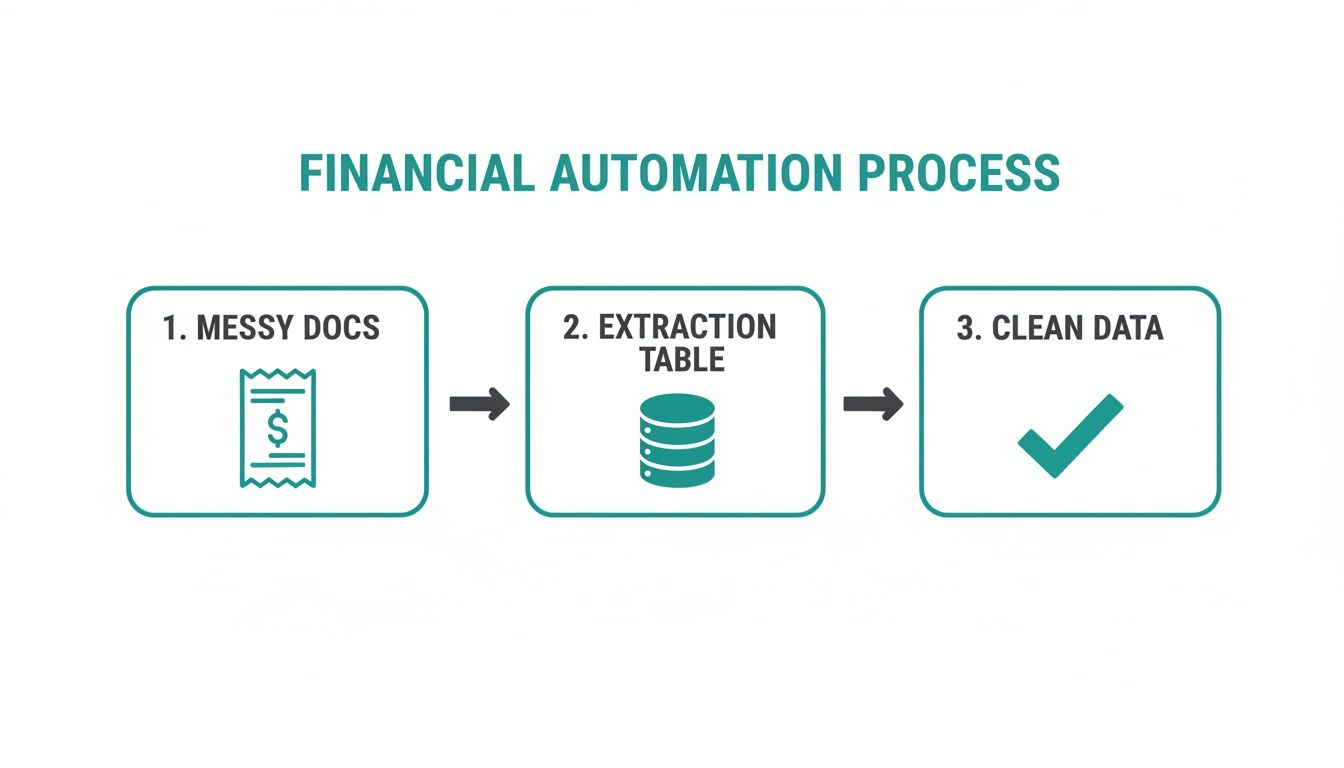
As you can see, the table is where the magic happens—transforming raw documents into something that can actually drive financial automation.
Core Fields for Transaction Data
So, where do you start? Every solid transaction schema is built on a handful of essential fields. These are the non-negotiables that capture the who, what, when, and how much of every single transaction, ensuring nothing important gets lost in translation.
Getting these basics right from the beginning will save you countless headaches down the road.
This table outlines a foundational schema, defining the essential fields, their recommended data types, and a brief explanation to get you started.
Essential Fields for a Transaction Data Extraction Table
| Field Name | Data Type | Description & Example |
|---|---|---|
| TransactionID | String / UUID | A unique identifier for the transaction. Example: txn_1a2b3c4d5e |
| VendorName | String | The merchant or supplier's name. Example: "Albert Heijn" |
| TransactionDate | Date | The date the transaction occurred. Example: 2023-10-26 |
| TotalAmount | Decimal | The full amount paid, including taxes. Example: 121.00 |
| TaxAmount | Decimal | The tax portion of the total amount (e.g., BTW). Example: 21.00 |
| Currency | String | The three-letter currency code. Example: "EUR" |
| Category/GLCode | String | The accounting category or General Ledger code. Example: "5010_Office_Supplies" |
These fields provide a robust starting point, capturing the most critical information needed for accurate financial tracking and reporting.
Planning for Future Complexity
While those core fields cover today's needs, a truly scalable schema is built with an eye toward the future. You might not be dealing with multiple currencies or complex expense categories now, but what about next year? Building in placeholders for that information from the get-go saves you from a world of hurt later.
For instance, financial categorisation is huge. A key part of any robust schema is connecting it to your company's chart of accounts. This is the framework that lets you map an expense from a receipt directly to the right bucket in your accounting system.
You should also think about adding fields like:
- PaymentMethod: Was this paid by credit card, bank transfer, or something else? This is crucial for reconciliation.
- Description: A free-text field to add context, like "Team lunch with Client X," which can be a lifesaver months later.
- LineItems: If you need granular detail, you'll eventually want to capture individual items from a receipt, not just the total. This is often handled in a separate, related table.
A great schema is a living document. It should be robust enough to handle today’s data with precision, yet flexible enough to accommodate the complexities of tomorrow without breaking your entire workflow. This foresight is what separates a good data extraction table from a great one.
Using Smart Validation to Guarantee Data Integrity
Extracted data is worthless if you can’t trust it. Once you've designed your schema, the next crucial step is building a self-policing system with smart validation rules. This isn't just a "nice-to-have" feature; it's the core process that turns a simple data extraction table into a reliable source of financial truth, guaranteeing accuracy long before that data ever touches your accounting software.

This proactive approach catches errors right at the source, preventing the kind of downstream contamination that leads to massive reconciliation headaches later on. Platforms like Mintline embed these checks directly into the extraction workflow, transforming data integrity from a manual chore into an automated safeguard.
Establishing Foundational Rules
Your first layer of validation should set firm, non-negotiable rules for your most critical data fields. Think of these as your first line of defence against common data entry slips and OCR interpretation errors. They might seem simple, but their impact on the overall quality of your dataset is massive.
What are the most common issues you run into with transaction data? For most businesses in the Netherlands, it usually comes down to inconsistent date formats and incorrect financial values. By enforcing strict standards here, you can eliminate a huge portion of potential problems right off the bat.
Your foundational rules ought to cover:
- Date Format Standardisation: Pick one format, like DD-MM-YYYY, and stick to it. This prevents any confusion between regional conventions (is 04-05-2024 April 5th or May 4th?) and ensures your chronological sorting is always spot-on.
- Positive Financial Values: Every monetary field—
TotalAmount,TaxAmount,Subtotal—must be a positive number. A negative value in a total field is almost certainly an error and should be flagged immediately for review. - Required Field Checks: Some fields are simply non-negotiable.
TransactionDate,VendorName, andTotalAmountshould never be empty. A quick validation rule can flag any record where these essential details are missing, stopping incomplete entries in their tracks.
These basic checks create a solid baseline of reliability for every single record that enters your table.
Implementing Cross-Field Validation
After you’ve validated individual fields, it's time to make sure they actually make sense in relation to each other. This is where cross-field validation comes in, adding a much-needed layer of logical consistency. It’s like having an automated bookkeeper double-checking the maths on every single receipt.
This type of validation is especially powerful for catching subtle but significant errors that basic checks would otherwise miss. For example, a receipt might have numbers in all the right places, but do those numbers actually add up?
The most crucial cross-field check you can implement is the financial sum validation. A rule must verify that the
Subtotalplus theTaxAmountequals theTotalAmountexactly. If they don't match, the record must be flagged for manual review. This usually points to a potential OCR error or a complex receipt that needs a human eye.
Handling Missing or Ambiguous Data
Let's be realistic: no extraction process is perfect. You're going to encounter missing data. A truly robust validation system doesn’t just reject these entries but handles them with a bit of grace. Instead of letting a blank Category field bring your entire workflow to a halt, you can implement rules to manage it intelligently.
For instance, Mintline automatically assigns a default "Uncategorised" value to any transaction that’s missing a category. This little trick ensures the record is still processed but can be easily filtered later for a manual once-over. This strategy keeps your automation running smoothly while maintaining a clear audit trail for any items that need a human touch. This is how you build a system that's both efficient and resilient.
Mapping Your Table to Accounting Software
A well-designed data extraction table is great, but its real power is unlocked when it talks fluently with your other financial systems. The whole point is to bridge the gap between messy transaction data and your accounting software. Think of your table as the central hub that feeds clean, validated information into platforms like Xero, QuickBooks, or Exact. This mapping process is what turns simple data collection into real financial automation.
This is the final step where all your hard work on schema design and validation rules really pays dividends. Get this right, and you’ll have a smooth, one-click export that populates your general ledger without anyone having to lift a finger. It's a core function of platforms like Mintline, which are built to handle these connections automatically.
Translating Fields Between Systems
The first hurdle you'll almost certainly hit is mismatched terminology. Your internal data table might call a field VendorName, but your accounting software might expect it to be labelled Supplier or Payee. This isn't just a simple rename; you need to build a clear translation layer between your system and whatever platform you're sending the data to.
A classic real-world example is categorisation. Your table’s Category field, holding a value like "Office Supplies," needs to map directly to a specific General Ledger (GL) Code or a Chart of Accounts entry in your accounting software, such as "5010".
Here are a few common translation tasks you'll need to handle:
- Field Name Mapping:
VendorNamein your table becomesContactNamein the final export file. - Date Format Conversion: Your internal
DD-MM-YYYYformat might need to be switched toYYYY-MM-DDfor the import to succeed. - Data Type Alignment: You have to make sure a
Decimalfield from your table is actually interpreted as a currency value by the receiving software.
Building Flexible Export Modules
To get the most out of your data extraction table, it’s a smart move to build export modules that can generate files in different formats. The two most common formats for accounting software are CSV (Comma-Separated Values) and JSON (JavaScript Object Notation).
Pretty much every platform on the planet accepts CSV for bulk imports, making it a reliable workhorse. JSON, on the other hand, is the go-to for more modern, API-based integrations.
The ability to export validated, correctly mapped data is the final, critical link in the automation chain. This is where your structured table becomes an active tool that eliminates manual data entry, reduces reconciliation time, and ensures your financial records are always accurate and up-to-date.
This kind of efficiency has a tangible impact. In regions like Noord-Holland, where innovation performance is 155.1% of the EU average, the economic benefits are obvious. Unicorn companies that build financial data tools have been shown to boost labour productivity by up to 10%, proving how smart data structuring directly contributes to a healthier tech ecosystem. You can find more insights on the Dutch regional innovation performance and what drives it.
By thoughtfully mapping your fields and creating flexible export options, you turn a static table into a dynamic, indispensable part of your financial tech stack. This systematic approach is the foundation of any effective automated accounts payable software, which simply can't function without these intelligent connections.
Avoiding Common Data Extraction Pitfalls
Even with a perfectly designed schema and rock-solid validation rules, you're still likely to hit a few tricky, yet common, challenges when building a data extraction table. Knowing what to watch out for can save you a world of pain and massive data clean-up projects later. These aren't obscure edge cases; they're the frequent hurdles that can compromise your whole financial automation setup.
The Currency Conundrum
One of the biggest oversights we see time and again is the mishandling of multiple currencies and their ever-changing exchange rates. If you do business internationally, you'll be dealing with invoices in EUR, USD, GBP, you name it. Just grabbing the TotalAmount won't cut it. You absolutely have to capture the Currency and, for true accuracy, the ExchangeRate on the exact date of the transaction.
Without that crucial bit of information, your financial reports will be fundamentally flawed. It's as simple as that.
Getting Lost in Regional Nuances
Another classic mistake is underestimating just how much things vary by region, especially when it comes to taxes. Here in the Netherlands, for instance, it's completely normal to see both the 9% and 21% BTW rates on a single invoice. A rigid schema with a single TaxAmount field just can’t cope with that. You'll end up lumping taxes together, losing the very detail you need for accurate tax filing.
A much smarter approach, and the one Mintline uses, is to design your table to handle multiple tax lines right from the start.
Building a future-proof data extraction table means designing for the complexity you'll face tomorrow, not just the simplicity you have today. This foresight prevents costly re-engineering as your business scales.
Then there's the often-forgotten element of data enrichment. Extraction isn't just about yanking raw data out of a document; it's about making that data more intelligent on the fly. For example, a system like Mintline doesn't just read "Albert Heijn." It can automatically enrich that vendor name by assigning the correct GL Code for "Groceries" or "Office Supplies" as part of the extraction process. Skipping this step means your team is left with a mountain of manual categorisation work, which defeats a huge part of the purpose of automation.
Don't Build Yourself into a Corner
Finally, try to avoid the trap of creating an overly rigid schema. Your business is going to change. You'll add new payment methods, expand into new countries, or start tracking costs by project. A schema that's too restrictive will break the moment your business needs shift, forcing you into a painful and disruptive redesign.
This kind of operational efficiency is becoming more critical across all industries. Take the Dutch data centre market, for example, which is currently navigating a 'Boom to Bottlenecks' challenge. Rising energy costs are pushing for smarter data management. Operators are now using refined data extraction tables to manage a 30% year-over-year increase in data volumes, which has led to 25% better predictive maintenance.
You can discover more insights about how efficient data structuring is helping the sector aim for carbon neutrality. By learning from these common pitfalls, you can build a system that’s not just accurate today, but flexible enough to grow right alongside your company.
A Few Common Questions
When you're deep in the weeds of building a financial automation workflow, some specific questions always seem to pop up. Let's tackle a few of the ones our customers ask most often.
What's the Best Export Format: CSV or JSON?
Honestly, this isn't an either/or situation. The best choice really depends on what you're doing with the data once you've extracted it.
CSV (Comma-Separated Values) is the old reliable. It’s simple, lightweight, and plays nicely with pretty much every spreadsheet and accounting program on the planet, like Excel or Exact. If you're doing direct imports, CSV is often the path of least resistance.
On the other hand, JSON (JavaScript Object Notation) is built for the web and APIs. Its nested structure is perfect for handling more complex data, like a single receipt that has multiple line items. Mintline's API uses JSON, which allows for deeper, more flexible integrations. The best platforms should offer both options.
How Do I Handle Invoices That Span Multiple Pages?
This one trips people up, but the solution is straightforward. You want to create one single, consolidated record in your main transaction table for the entire document. Think of it as the master record for that whole invoice.
The key is to use a unique identifier, like a SourceDocumentID field, to link all the extracted data back to the original file. If you’re pulling out individual line items, they should live in a separate LineItems table. Each entry in that table would then reference the main transaction's ID, creating a neat parent-child relationship that keeps everything organised and easy to query.
Can This Whole Data Extraction Table Be Automated?
Absolutely—in fact, automation is the entire point! The goal is to get away from manual data entry for good.
That’s where tools like Mintline come in. They're built from the ground up to do exactly this. Using Optical Character Recognition (OCR) and AI, they can scan an image of a receipt or invoice, pull out all the key information, and populate a structured data table automatically. The process even handles validation and categorisation, turning a painfully slow task into a background process.
How Should I Manage Different Tax Rates, Like the 9% and 21% BTW?
Ah, the Dutch BTW system. A classic challenge. The most reliable way to handle varying tax rates is to give each component its own dedicated field. For instance, your table could have columns like TaxAmount_Low and TaxAmount_High.
To make it even clearer, you could add TaxRate_Low and TaxRate_High columns to store the actual rates (e.g., 9.00 and 21.00). If you're working at the line-item level—which is often the cleanest approach—each line item should get its own TaxRate and TaxAmount fields. This granular detail pays off big time, making tax reporting much more accurate and less of a headache.
Ready to stop wrestling with receipts and invoices? Mintline uses AI to automatically link every bank transaction to its source document, ending manual matching for good. Start streamlining your finances today.