
A Guide to Purchase to Pay Software and Financial Automation
Discover how purchase to pay software streamlines procurement and boosts efficiency. Learn the P2P process, key features, and how to select the right solution.
Purchase-to-pay software is the digital backbone for your entire procurement process. It connects everything, from the moment someone requests a purchase to the final payment landing in your supplier's bank account. Think of it as the central command centre for all company spending, a crucial first step in a truly automated financial workflow that Mintline completes.
What Is Purchase-to-Pay Software and Why It Matters
Ever felt like your company’s purchasing process is like an orchestra without a conductor? Every musician plays their own tune. Requisitions are all over the place, approvals vanish into email black holes, and payments are completely out of sync. It's this exact kind of chaos—the friction, wasted time, and financial blind spots—that purchase-to-pay software is built to fix.
P2P software steps in as that much-needed conductor, bringing every step of the process together into one smooth, cohesive system. It creates a clear, guided path for everyone, starting from when an employee first identifies a need all the way through to paying the final invoice. All the guesswork and manual grunt work that bog down old-school procurement workflows? Gone.
The Problem with Manual Processes
Let's be honest, manual procurement is a mess. It’s a tangled web of spreadsheets, paper invoices, and email chains that seem to have no end. Not only is this approach painfully slow, but it's also wide open to human error. Key documents get lost, duplicate payments accidentally slip through, and without one central place to look, it’s almost impossible to know what the company has actually committed to spending.
This lack of visibility and control creates some serious headaches:
- Maverick Spend: Employees go rogue, buying things outside of approved channels, often from unvetted suppliers and at higher prices.
- Costly Errors: Manual data entry inevitably leads to mistakes—wrong payment amounts, late payments that sour supplier relationships, and missed chances to grab early payment discounts.
- Wasted Time: Your finance and procurement teams are stuck chasing approvals, matching invoices to purchase orders, and keying in data instead of doing the strategic work they were hired for.
A solid P2P system turns procurement from a reactive, paper-pushing chore into a proactive, strategic function that boosts your financial health and operational efficiency.
A Strategic Asset for Financial Control
Ultimately, purchase-to-pay software isn't just a fancy tool for buying stuff. It’s a strategic asset that gives you complete control over your company's spending. By taking the whole process digital, you can enforce purchasing policies, speed up financial closing, and make smarter decisions based on data you can actually trust. When paired with a reconciliation tool like Mintline, it creates a fully auditable trail from request to balanced books.
The market reflects just how critical these systems have become. The global Procurement to Pay Software Market was valued at roughly USD 8.103 billion in 2024 and is expected to balloon to USD 21.99 billion by 2035, growing at a compound annual growth rate of 9.5%. You can discover more insights about this market growth on marketresearchfuture.com. This isn't just a fleeting trend; it shows that more and more organisations are relying on P2P systems to build a foundation for scalable, predictable, and transparent financial management.
Navigating the Complete Purchase-to-Pay Process
The purchase-to-pay process, often just called P2P, covers the entire lifecycle of a purchase within your company. It kicks off the second someone identifies a need and isn't truly finished until the supplier has been paid and the books are balanced. Without a clear system, this journey can quickly become chaotic, full of wrong turns and costly delays.
Think of it like trying to build flat-pack furniture without the instruction manual. You might get something that resembles a table, but it's wobbly, and you're left with a mysterious pile of extra screws. That's what manual P2P processes feel like—disconnected, confusing, and the end result is often questionable. Purchase-to-pay software is the instruction manual, giving everyone a clear, step-by-step guide to follow.
Step 1: From Need to Requisition
It all starts with a simple need. Maybe the marketing team requires a new analytics subscription, or the office manager needs to order more coffee. In a manual setup, that request is often just a quick email or a chat in the hallway, making it a nightmare for the finance team to track.
A P2P system brings order from the very beginning. An employee creates a formal purchase requisition right inside the software. This digital form captures every key detail: what's needed, how many, the expected cost, and why it's necessary. This is the official starting pistol for a fully traceable procurement journey.
Step 2: Approval and Order Creation
Once the requisition is in, it needs a green light. Manually, this is where things grind to a halt. It means chasing down managers for signatures, forwarding endless email chains, and praying the request doesn’t get lost in a cluttered inbox. This one step can easily hold up the process for days or even weeks.
An automated system, on the other hand, routes the requisition straight to the right manager based on predefined rules, like department or budget amount. Approvers get a notification and can approve (or reject) the request with a single click, often right from their phone. As soon as it’s approved, the system instantly converts it into a professional purchase order (PO) and zips it over to the vendor.
Step 3: Receiving Goods and Services
The supplier fills the order, and the delivery arrives. In a paper-based world, the delivery note might go missing, or there’s no formal confirmation that what you ordered is what you actually got. This gap creates huge headaches when an invoice appears for an incorrect or incomplete shipment.
A P2P platform solves this by creating a digital goods receipt. The team receiving the items can quickly confirm the delivery, flag any issues, and attach photos or documents. It’s a simple but vital step that creates a clear record of fulfilment, which is essential for what comes next.
The real magic of a P2P system is that it creates an unbroken digital chain of evidence. Every action—from the initial request to the final confirmation of receipt—is linked together, providing a single source of truth for every single purchase.
Step 4: Invoice Processing and Payment
Finally, the supplier's invoice lands in your accounts payable team's lap. This is where manual processes completely fall apart. The team has to painstakingly match the invoice against the original PO and the goods receipt—a tedious task known as three-way matching. The tiniest mismatch can stop everything, leading to late payments and unhappy suppliers.
P2P software automates this entire headache. The system pulls in the digital invoice, reads the details, and instantly checks it against the PO and receipt data. If it all matches, the invoice is flagged for payment with almost no human intervention required. This doesn't just speed things up; it's a powerful defence against overpayments and fraud. The final step—matching this approved payment to the bank transaction—is where Mintline completes the automation.
This visual shows how P2P software transforms a messy, uncontrolled process into a well-oiled machine.
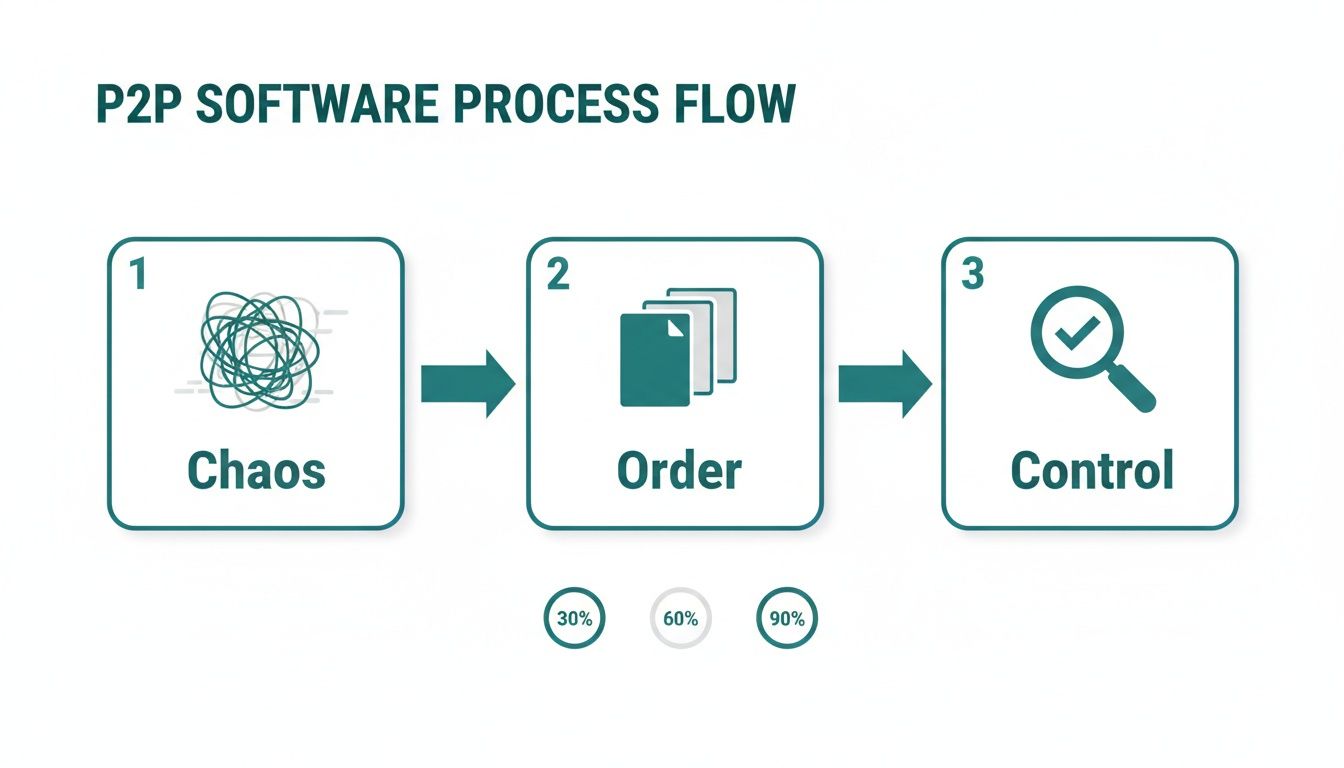
The journey from tangled, inefficient manual workflows to an organised system gives you complete control and visibility over every penny your company spends.
Manual P2P vs Automated P2P Workflow
To truly see the difference, it helps to put the old and new ways side-by-side. The contrast highlights just how much time and effort is wasted on tasks that software can handle in seconds.
| Process Stage | Manual Approach (The Old Way) | Automated P2P Software (The New Way) |
|---|---|---|
| Requisition | Ad-hoc emails, paper forms, verbal requests. No central tracking. | Standardised digital forms submitted in a central system. Fully trackable from the start. |
| Approval | Chasing signatures, forwarding long email chains. Prone to long delays and lost requests. | Automated routing based on pre-set rules. Approvals happen in one click, often on mobile. |
| PO Creation | Manually creating POs in a spreadsheet or Word. Risk of typos and errors. | PO is generated automatically from the approved requisition and sent to the vendor. |
| Goods Receipt | Paper delivery notes that are easily lost. No formal link to the PO. | Digital goods receipt created in the system, instantly linking delivery to the original order. |
| Invoice Matching | AP team manually performs three-way matching. Time-consuming and error-prone. | System automatically matches invoice, PO, and receipt. Exceptions are flagged for review. |
| Payment | Manual payment runs and data entry into accounting software. | Approved invoices are sent for payment automatically, with seamless export to accounting systems. |
The table makes it clear: automation doesn't just make the P2P process faster, it makes it smarter, more accurate, and far more secure.
What Makes Great P2P Software? The Must-Have Features
The difference between a good purchase-to-pay tool and a great one lies in its core features. The right purchase-to-pay software doesn't just put your old paper-based process onto a screen; it genuinely rebuilds it with smart, connected tools. These are the non-negotiables that truly define a powerful P2P system.
Think of it like building a high-performance engine. Each component has a specific job, but they all need to work together seamlessly to drive your business forward. Without these key features, you're left with a system that just can't keep pace.
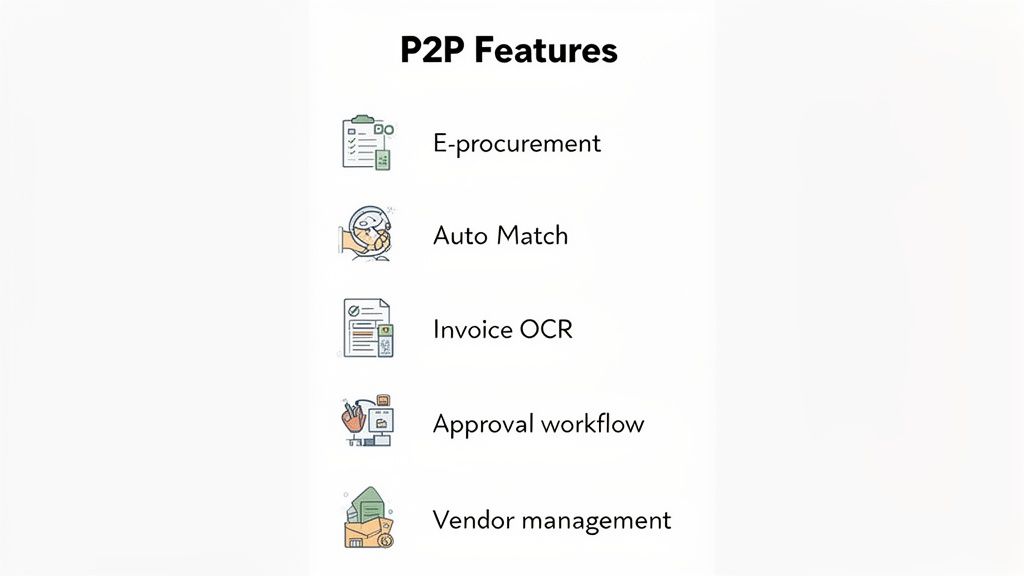
Digital Invoice Capture and Processing
Let's be honest, manual data entry is the arch-nemesis of any efficient accounts payable team. Modern P2P software tackles this problem head-on with digital invoice capture. Using Optical Character Recognition (OCR), the system can instantly "read" invoices from PDFs or scans, pulling out all the crucial details—vendor name, invoice number, line items, and totals.
This single feature wipes out the tedious, error-prone task of typing everything in by hand. The payoff? Invoices get processed faster, mistakes plummet, and your finance team is freed up to focus on work that actually requires their expertise. To see just how this works under the hood, our guide on automated document processing breaks down this cornerstone technology.
Automated Three-Way Matching
This is where the real magic happens. Automated three-way matching is the system's built-in detective, verifying every invoice before a single cent is paid. It cross-checks three critical documents to make sure everything lines up:
- The Purchase Order (PO): What your team agreed to buy.
- The Goods Receipt: What was actually delivered and signed for.
- The Supplier Invoice: What the vendor is asking you to pay for.
When all three documents match perfectly, the invoice is automatically cleared for payment. Simple. But if there’s a mismatch—say, the price is wrong or the quantity is off—the system immediately flags it for a human to review. This automated check is your best line of defence against overpayments, duplicate invoices, and even fraud.
By automating three-way matching, businesses can slash invoice processing times by over 70%. It’s a simple concept that eliminates a massive bottleneck, ensuring suppliers get paid on time and keeping those vital relationships strong.
Configurable Approval Workflows
Rigid, one-size-fits-all approval chains just don’t cut it in the real world. A top-tier P2P solution lets you build flexible, configurable approval workflows that mirror your company's actual structure and spending policies. You can set rules based on anything—department, spend amount, project code, you name it.
For example, a €500 software subscription might just need a quick nod from the department manager. But a €10,000 capital expense? That could be routed automatically from the department head to the CFO, and then to the CEO for final sign-off. This flexibility ensures every purchase gets the right level of scrutiny without gumming up the works, making compliance an automatic part of the process.
Centralised Vendor Management
Trying to manage supplier information across random spreadsheets, email chains, and sticky notes is a recipe for chaos. A proper purchase-to-pay software includes a centralised vendor portal that acts as a single source of truth for all supplier data. Everything from contact info and banking details to contracts and performance reviews lives here.
This central hub makes onboarding new suppliers a breeze, lets you update information securely, and allows you to track performance over time. When a contract is up for renewal, all the data you need to negotiate effectively is right at your fingertips. It also minimises risk by ensuring you’re only dealing with approved, vetted vendors, which helps stamp out maverick spending and fortifies your supply chain.
What's the Real-World Payoff of P2P Automation?
Beyond a list of shiny features, what tangible difference does purchase-to-pay software actually make for a business? It’s not just about a slicker process; it's a strategic move that delivers a serious return by fortifying your company’s financial health.
The value really breaks down into three core areas: direct cost savings, major efficiency boosts, and far better financial control. Each one plays a direct role in creating a healthier, more resilient bottom line.
Cutting Down on Costs
The most immediate win from P2P automation is its power to stop money from needlessly slipping through the cracks. It tackles maverick spend—those unauthorised purchases made outside of approved channels—by locking in your purchasing rules right from the start. When your team has to follow a clear, digital path, it's tough to sidestep negotiated contracts and go off-piste with suppliers.
On top of that, speeding up invoice processing means you can consistently grab early payment discounts. A 2% discount for paying in 10 days instead of 30 might not sound like much, but scale that across thousands of invoices and the annual savings really start to stack up.
Making Your Team More Efficient
A huge reason businesses switch to P2P software is to improve operational efficiency across the entire buying and paying cycle. Think about it: manual data entry, chasing approvals over email, and painstakingly matching documents are massive time drains for any finance team. Automation simply makes these chores disappear.
Imagine your accounts payable clerk, who spends hours every week just typing up invoice details. A P2P system with OCR technology does the same job in seconds. This frees up your team member to focus on work that actually adds value, like analysing spend or negotiating better terms with vendors. Quicker approval cycles also mean suppliers get paid on time, which is key to maintaining strong relationships.
You can dive deeper into this topic in our guide on the benefits of automated accounts payable systems.
Gaining Unbeatable Financial Control and Visibility
Maybe the most powerful benefit is the incredible control and visibility P2P software gives you. Every single financial commitment, from the initial request to the final payment, is tracked in real-time in one central hub. This gives senior leaders an accurate, live snapshot of cash flow and how spending is tracking against budgets.
With a centralised P2P system, financial leaders can shift from reactive fire-fighting to proactive strategic planning. The question changes from "What did we spend last month?" to "What are we committed to spending right now?"
This level of insight is also a game-changer for compliance, making audits far smoother and less of a headache. It turns procurement from a siloed administrative task into a source of strategic intelligence that fuels smarter business decisions. When combined with an automated reconciliation tool like Mintline, this visibility extends all the way to your final, balanced books.
How to Choose and Implement the Right P2P Solution
Picking the right purchase-to-pay software is a huge decision, one that really sets the tone for your company's entire financial workflow. If you get it wrong, you're looking at a system nobody wants to use, constant friction in your processes, and a lot of wasted money. The trick is to look past the shiny features and get down to what your business actually needs.
A smart selection process always starts with a rock-solid understanding of your own requirements. It’s easy to get wowed by a massive system built for a global corporation, but if you're a growing SME, that’s just overkill. You need a solution that fits your current ways of working but has enough room to grow alongside you.
Key Evaluation Criteria for P2P Software
Before you even book a single demo, you need to sit down and figure out your non-negotiables. This simple checklist will help you cut through the noise, filter out vendors that aren't a good fit, and zero in on the solutions that will genuinely work for your organisation.
- Scalability: Ask yourself: will this software still work for us in three to five years? Look for platforms that can handle more transactions and more users without grinding to a halt or hitting you with a surprise price hike.
- User Experience (UX): Let’s be honest, if the software is clunky and a pain to use, your team will find a way to avoid it. A clean, intuitive interface is absolutely essential for getting everyone on board and ensuring they stick to the new process.
- Integration Capabilities: Your P2P system can’t live on an island. It has to talk seamlessly with the rest of your finance tools, especially your accounting or ERP software. This is critical for connecting to tools like Mintline to ensure data flows smoothly from procurement to final reconciliation.
A Roadmap for Successful Implementation
Choosing the software is really just the first step; the rollout is where you actually see the return on your investment. A well-thought-out implementation plan is your best defence against chaos, making the switch from old manual methods to a new automated workflow as smooth as possible.
- Map Your Current Processes: You can't automate what you don't understand. The first thing to do is document your entire P2P workflow, from the moment someone requests something to the final payment, noting all the bottlenecks and pain points.
- Cleanse and Migrate Data: A new system is only as good as the data you feed it. Make sure you dedicate time to cleaning up your vendor lists and tidying up historical purchasing data before you move it across.
- Configure and Test: Work closely with your new software partner to set up approval workflows and spending rules that mirror your company policies. Then, get a small group of users to put the system through its paces to catch any issues early on.
- Train Your Team: This is more than just a "click here, then here" session. You need to explain the why behind the change—how this new tool will make their jobs easier and help the whole company.
- Go Live and Gather Feedback: Once you launch, keep the conversation going. Actively ask for feedback from your team to quickly address any problems and show them that their experience matters.
A critical factor in a successful P2P implementation is change management. Securing buy-in from all stakeholders—from the finance team to the employees making purchase requests—is essential for a smooth transition and rapid adoption.
Following an organised approach like this takes the mystery out of the process and helps you make a choice that avoids the usual headaches. Since so many modern P2P solutions are cloud-based, having a solid grasp of cloud bookkeeping services for small businesses can really help inform both your selection and implementation strategy.
And the move to these platforms is only getting faster. The IT Services market in the Netherlands, which includes P2P solutions, was valued at USD 19.17 billion in 2025 and is on track to hit USD 35.10 billion by 2030. This boom is largely thanks to SMEs embracing cloud-based SaaS tools for their lower upfront costs and greater flexibility. Discover more insights about the Netherlands IT market on mordorintelligence.com.
Completing the Automation with Mintline
A solid purchase to pay software solution is brilliant at organising your company's spending, from the initial request right through to payment approval. It creates a tightly controlled environment where you can track every purchase and validate every invoice. But here’s the catch: once the payment goes out, a critical gap often appears, one that can drag your team right back into hours of manual drudgery.
This is the reconciliation gap. Your P2P system has done its job, the invoice is approved, and the bank has processed the payment. What’s left? The final, crucial step of matching the transaction from your bank feed back to the original invoice. Without the right tool, this turns into a painstaking hunt through spreadsheets and bank statements, completely undermining the efficiency you thought you’d gained.
Bridging the Final Mile of Financial Automation
This is exactly where Mintline comes in to close the loop. Think of your P2P system as the powerful engine that gets you 90% of the way there. Mintline is the smart "last-mile" delivery service that ensures every financial record arrives at its final destination, perfectly accounted for.
Mintline plugs directly into your bank feeds and gets to work automatically matching every outgoing payment to its corresponding invoice or receipt. It intelligently links the two, creating a complete, unbroken audit trail from the initial purchase request all the way to the reconciled entry in your accounting software.
A Truly Touchless Workflow from Purchase to Books
This final link in the chain is what turns your process from mostly automated to fully automated. Instead of your team spending hours each month manually ticking off bank transactions against a list of invoices, they can simply review the matches Mintline’s AI has already made. This doesn't just save time; it removes the risk of human error, ensures your books are always accurate, and frees up your finance team for more valuable, strategic work.
Here’s a quick look at how Mintline gives you a clear visual on reconciled data, finally connecting the dots between invoices and bank transactions.
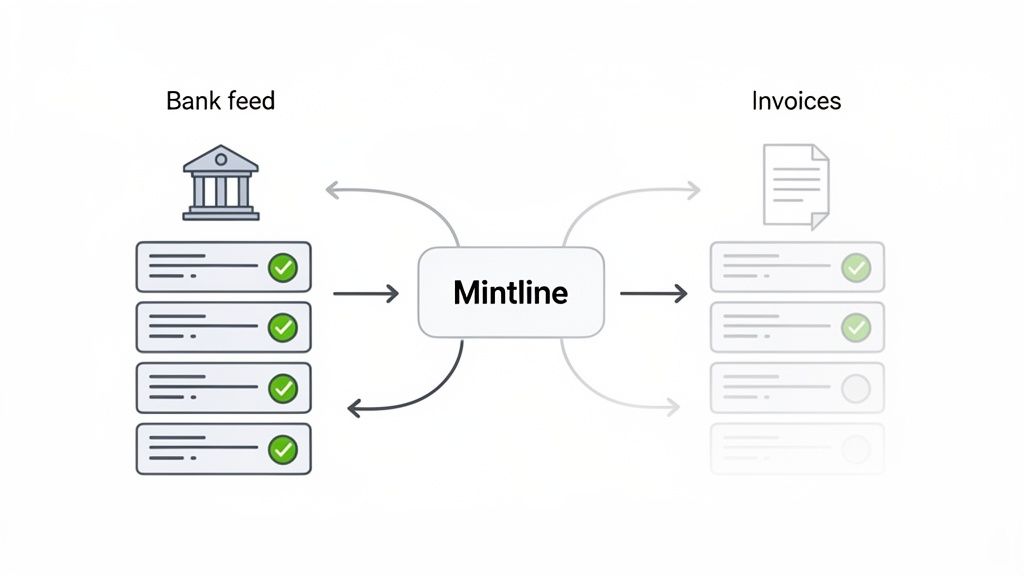
This kind of dashboard provides at-a-glance clarity, showing you instantly what’s been matched and what might need a second look. It transforms a complicated task into a simple review. To see more on how this helps your finance department, you might want to check out our guide to automated accounts payable software.
Mintline complements your investment in purchase to pay software by automating the final, most tedious step of the financial workflow. It ensures that the efficiency gained in procurement isn't lost during reconciliation, delivering true end-to-end automation.
By adding Mintline to your setup, you create a system where data flows effortlessly from purchase requisition to invoice approval, then from bank payment to reconciled accounting entry. This complete approach gives you total financial clarity and control, helping you close your books faster and with far more confidence. It’s the finishing touch that makes your entire financial automation strategy work.
Still Have Questions About P2P Software?
Even when you see the clear benefits, stepping into the world of purchase-to-pay software can feel a little daunting. A few common questions almost always pop up. Let's get them answered so you can move forward with confidence.
Is This Stuff Just for Big Corporations?
Not at all. That’s a common misconception, probably because large enterprises were the first ones to jump on board years ago. Today, modern cloud-based P2P platforms are designed to scale. They’re flexible and affordable enough for small and medium-sized businesses (SMBs) to get in the game.
Most providers now offer tiered pricing, so you can start with what you need right now and expand the system’s capabilities as you grow. For an SMB, getting a P2P system in place early is a smart, proactive move. It builds good spending habits from day one and gives you the clear financial visibility you need to navigate growth spurts without losing control of your cash flow.
How Long Will It Take to Get a P2P System Running?
This really depends. The timeline can be surprisingly short or a more involved project. A small business going with a standard cloud solution could be operational in just a few weeks. On the other hand, a large, multinational company needing custom workflows and deep integrations with other legacy systems might be looking at a multi-month project.
What really dictates the speed of the rollout?
- How clean and organised is your current vendor data?
- How complex are your internal approval chains?
- How much time and energy can your team dedicate to training and adoption?
Honestly, the biggest factor isn't the software itself—it's how ready your organisation is for the change. A team that's prepared and has clear objectives will always have a faster, smoother implementation.
What's the Difference Between "Purchase to Pay" and "Procure to Pay"?
This one’s easy: there is no difference. 'P2P,' 'Purchase-to-Pay,' and 'Procure-to-Pay' are just different labels for the exact same process. They all describe the complete journey from an employee first needing a product or service all the way to the final payment being sent to the supplier and recorded in your books.
Why the different names? It often just comes down to habit or what a particular software vendor prefers to call it. But the underlying function is identical. No matter the name, the goal is to connect all the dots into one smooth, controlled workflow, from need to final settlement.
By integrating a P2P system and closing the final reconciliation gap, you build a truly automated financial workflow. Mintline provides that critical last step, ensuring every payment is matched and your books are always accurate. Learn how Mintline completes your financial automation at https://mintline.ai.