
Translate PDF Scan Files Without Losing Your Formatting
Learn how to translate PDF scan documents accurately. Our guide covers OCR, layout preservation, and security tips for flawless business document translation.
Before you can translate a scanned PDF, you have to pull the text out of the image. That’s where Optical Character Recognition (OCR) comes in. It’s the essential first step that turns a flat picture of words into something a computer can actually read and work with. Once you have that editable text, a smart translation tool like Mintline can take over, handling the language conversion while keeping your original formatting intact. What used to be a major headache is now a much simpler task.
The Real Challenge with Translating Scanned PDFs
If you're running a business today—whether you're a freelancer with clients worldwide or a startup expanding into new markets—you're dealing with documents in different languages all the time. Think about all the scanned invoices, contracts, and receipts that cross your desk. They all share a common, frustrating problem: a scanned PDF is essentially just a picture of text.
Because it’s an image, you can't just copy and paste the words into a translation tool. It won't work. For many small businesses and freelancers, this has traditionally meant hours of soul-destroying manual work, typing everything out word-for-word just to get it into a state where it can be translated. It's slow, tedious, and a perfect recipe for errors.
Why Standard Methods Fail
The problem is baked right into the file type. A PDF created from a Word document has selectable, encoded text. A scanned PDF? It’s a photograph. That’s it. It’s precisely this kind of messy, real-world problem that modern AI was designed to fix. It's a bit like trying to get clean, usable data out of a shoebox full of crumpled, scanned bank statements—you need a sophisticated platform like Mintline to make sense of it all.
For any business, struggling to translate scanned documents isn't just a minor annoyance. It's a genuine bottleneck that can slow down everything from financial reporting and compliance checks to day-to-day operations.
The Growing Need for an Automated Solution
The demand for smarter ways to handle documents is exploding. Here in the Netherlands, the market for Language Translation NLP is growing at an incredible rate—a projected 30.48% annually between 2025 and 2031. That's expected to push the market to a value of US$1.62 billion by 2031. You can dig into more of this data on Statista.
For Dutch freelancers and small businesses, this isn't just a statistic; it signals a fundamental shift. Relying on manual data entry for translations is quickly becoming unworkable. The risk of errors and the sheer amount of time wasted are just too high. This is exactly where AI-powered platforms like Mintline come into their own. By combining OCR with intelligent data extraction, they turn a static image into structured, translatable information, making the whole process smooth and automated.
Turning Images into Translatable Text with OCR
The biggest hurdle with a scanned PDF is that it's not really a document, it's a picture. Before any translation can happen, you have to pull the text out of that image. This is where Optical Character Recognition (OCR) comes in. It's the essential first step, the technology that intelligently scans the image, recognises the shapes of letters and words, and converts them into actual, editable text.
Without OCR, your scanned document is effectively locked. Translation tools can't read it because, as far as they're concerned, there's nothing there to translate but pixels. OCR is the key that unlocks it all, whether you're working with a dense financial report or a simple one-page invoice. If you want to get into the nitty-gritty of how this works, our guide on how to extract text from a PDF breaks it down further.
This diagram shows the classic problem many people run into and how a modern, AI-based approach solves it.
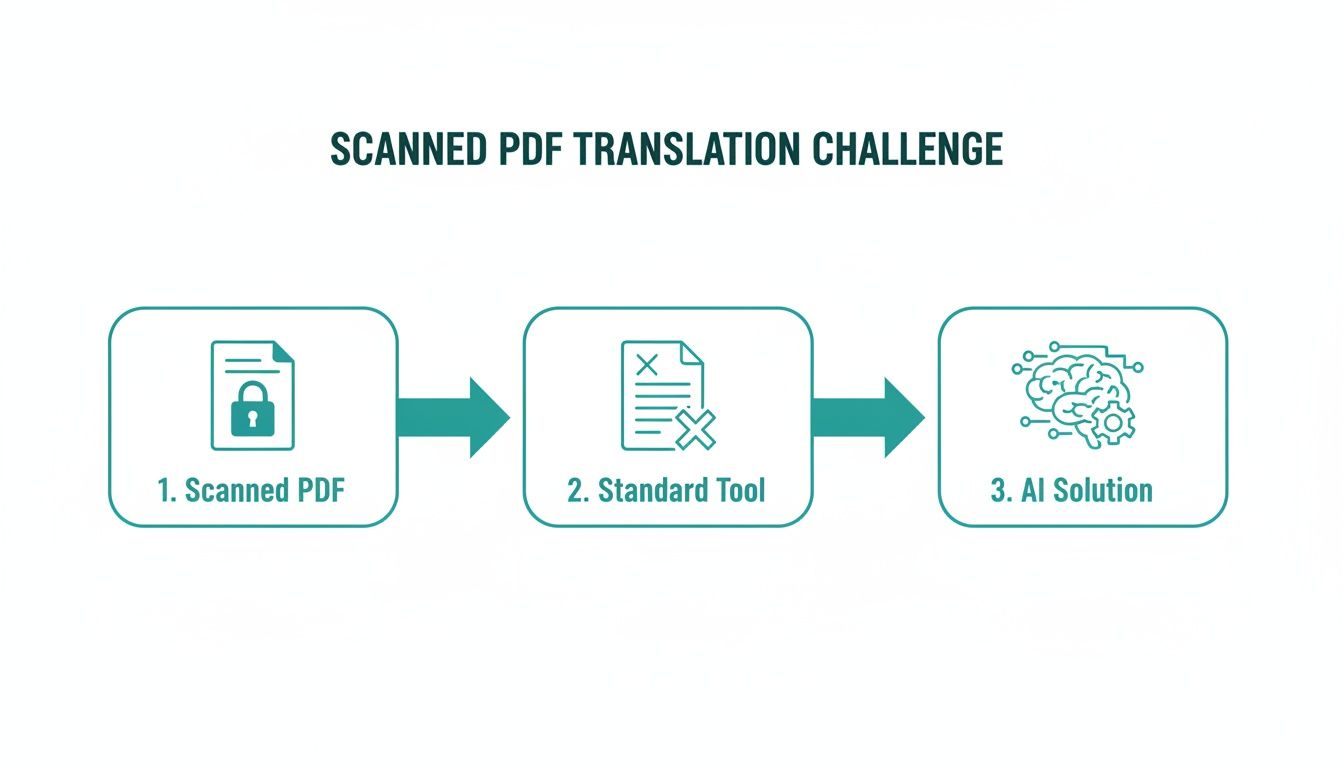
As you can see, conventional software hits a wall with image-based PDFs. An AI-powered solution, on the other hand, glides right through, turning the image into usable text and paving the way for translation.
Local vs. Cloud OCR: Which is Right for You?
When it comes to choosing an OCR tool, you've got two main routes: local software that runs on your computer or cloud-based services that do the heavy lifting online. The best fit for you really boils down to your priorities—usually a trade-off between privacy and raw power.
-
Local OCR Tools: These are apps you install on your own machine. Think of the OCR function built into macOS Preview or other dedicated desktop software. They’re fantastic for quick, one-off jobs and offer top-notch privacy because your files never leave your device. A freelance designer who just needs to translate a single scanned contract might opt for a local tool. It's secure and straightforward. The downside? They can sometimes struggle with complex layouts and almost never offer batch processing.
-
Cloud-Based OCR Services: These powerful platforms, like those integrated into Mintline, process your documents on high-performance remote servers. This gives them a major advantage in accuracy, especially with messy, low-quality scans or tricky formatting. They're built from the ground up to handle huge volumes of documents at once. Imagine an international logistics company that needs to process and translate hundreds of shipping manifests daily—a cloud service is the only practical way to do that efficiently.
Ultimately, the choice between local and cloud OCR is a balancing act. Do you need the absolute data security of keeping everything on your own computer, or do you need the superior accuracy and sheer scale that a cloud platform offers?
For those with a more technical bent, exploring a resource like Mastering Python PDF Text Extraction can offer a fascinating glimpse under the hood. For most businesses, especially when sensitive information is involved, a secure and specialised cloud platform like Mintline is nearly always the smarter, more reliable choice.
Choosing the Right Translation Tool for Your Documents
Once you’ve run your scanned document through OCR and have clean, editable text, you’ve reached a critical fork in the road: picking the right translation tool. The options can feel overwhelming, ranging from free browser-based services to sophisticated AI platforms built for business. The best choice really boils down to your specific needs—it's a balancing act between accuracy, cost, and security.
A quick, informal translation for something non-sensitive? Sure, a free online tool might do the trick. But when you’re dealing with business documents—think contracts, invoices, or financial reports—the stakes are much higher. In those cases, accuracy isn’t just a nice-to-have; it's essential, and the tool needs to understand industry-specific jargon. This is where a specialized platform like Mintline excels.
Comparing Your Translation Options
Different tools produce wildly different results. You can copy and paste your text into a public translator, but you'll get a wall of words back with zero formatting. The document's original structure will be completely gone. Professional tools, on the other hand, are designed to maintain that integrity, which is absolutely crucial for any official paperwork.
To help you decide, let's break down the common methods. Each approach has its place and is suited for different situations.
Comparison of PDF Translation Methods
Here’s a look at how different translation methods stack up. This should help you pinpoint which one aligns best with your project’s demands for precision, budget, and confidentiality.
| Method | Best For | Accuracy | Layout Preservation | Cost |
|---|---|---|---|---|
| Free Online Translators | Casual, non-sensitive text snippets and getting the general meaning. | Low to Medium | None | Free |
| Professional AI Platforms | Business documents, contracts, and financial reports requiring high accuracy and formatting. | High | High | Subscription-based |
| Human Translators | Legally binding contracts and highly nuanced marketing materials. | Very High | Manual Re-creation | High |
The trade-off is pretty clear. Free tools are great for quick access, but they simply don't cut it for professional work where the document’s layout is just as important as the translated words.
Why Layout Preservation Matters Most
Let's get practical. Imagine you need to translate a scanned invoice from an international supplier. A free tool might translate "Amount Due" perfectly, but what happens if it throws that text into the wrong column or deletes the table structure? The document becomes a confusing mess, completely useless for your accounting team.
This is precisely why tools like Mintline, which can intelligently rebuild a document's structure after translation, are so valuable. They don't just give you words; they give you a usable, professional file that looks just like the original.
The financial implications here are massive. Europe is on track to dominate 45.2% of the global translation services market by 2035. For small and medium-sized enterprises in the Netherlands, this adds up to an estimated €15 billion in annual translation costs. Scanned international receipts are a huge part of that headache. AI-driven translation can drastically cut down the time spent on manual processing and give productivity a real boost. For more data, check out this detailed translation service market report.
Choosing a translation tool isn’t just about converting words. It's about producing a final document that is accurate, professional, and structurally identical to the original—making it ready for legal, financial, or client-facing use.
If you're serious about working smarter, not harder, an integrated solution is the only way to go. A platform that pairs high-quality text recognition with intelligent translation means you can confidently translate a PDF scan without losing hours to manual clean-up. This all starts with good OCR, and you can dive deeper by exploring our guide to the best OCR software.
Keeping Your Document Layout Intact After Translation
Getting the words right is only half the job when you need to translate a PDF scan. What good is a perfect translation if the final document is a jumble of misplaced text and broken tables? It's practically unusable. For official documents, the real goal is a translated file that looks and feels exactly like the original. That’s non-negotiable.
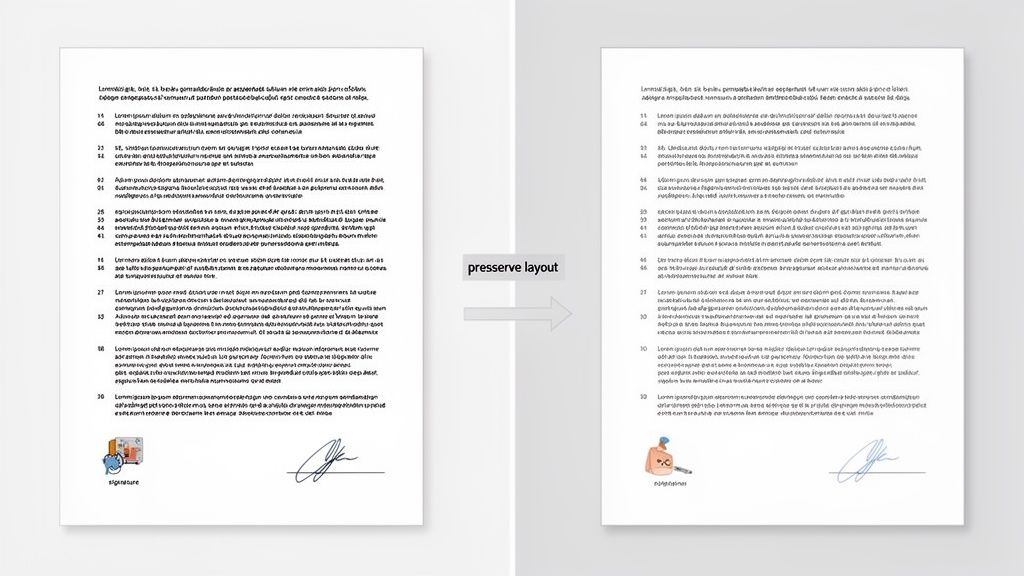
This means slotting the newly translated text back into the original visual framework. While basic tools just spit out a plain text file, more sophisticated platforms like Mintline are built to reconstruct the document, keeping everything from font styles to image placement perfectly aligned.
The Challenge of Rebuilding a Document
Here’s something I’ve seen countless times: after translation, text length almost always changes. A short, punchy English sentence might become a much longer one in German, and that alone can throw your entire layout into chaos. This is precisely why automated document reconstruction is so critical.
Let’s think about a real-world scenario. A Dutch marketing agency needs to translate a scanned client contract into English. This isn't just a block of text; the contract has specific clause numbers, signature lines, and neatly formatted tables outlining deliverables.
- Clause Numbers: The numbering has to stay perfectly aligned with the correct paragraphs. No exceptions.
- Signature Lines: These must remain in their designated spots, clearly tied to the right signatory.
- Tables: The columns and rows detailing services and costs have to be rebuilt exactly as they were.
Trying to just copy and paste the translated text would turn this structured legal document into an absolute mess. A proper platform with layout preservation capabilities understands these structural elements and works intelligently to maintain the document’s integrity.
Preserving the layout isn't just about looking good; it's about maintaining the document's legal and professional validity. For financial and legal paperwork, a clean, audit-ready translated copy is essential.
From Translated Text to Polished PDF
Once the translated text is correctly placed back into the document's structure, the final move is to export it into a high-quality, usable format. Ideally, you don't just want a PDF—you want a searchable PDF. This makes a world of difference, as it means the text inside is selectable and can be found with a simple search, which is incredibly handy for audits or finding specific information quickly.
For sensitive documents, security features during export are also a must. You should be looking for options to:
- Password-protect the file to control who can open it.
- Set permissions to stop unauthorised printing or editing.
- Ensure the file is optimised, so it’s easy to share without being enormous.
Creating a clean, searchable, and secure PDF is the final piece of the puzzle. It takes a previously locked, unreadable scan and turns it into a fully functional and professional document, ready for any business purpose.
Getting this entire process right—from the initial scan to a translated, searchable file—can be tricky. For a deeper dive into the tech that makes this possible, you can learn more about how PDF OCR converts documents into structured data in our detailed guide. It really unpacks how modern tools handle these challenges so effectively.
How to Securely Handle Sensitive Scanned Documents
When you're dealing with a scanned PDF full of sensitive information—think contracts, invoices, or bank statements—security isn't just a nice-to-have feature. It’s absolutely essential. Using a random, unsecured online tool for these documents is the digital equivalent of leaving your company's financial records on a park bench. It's just not worth the risk.
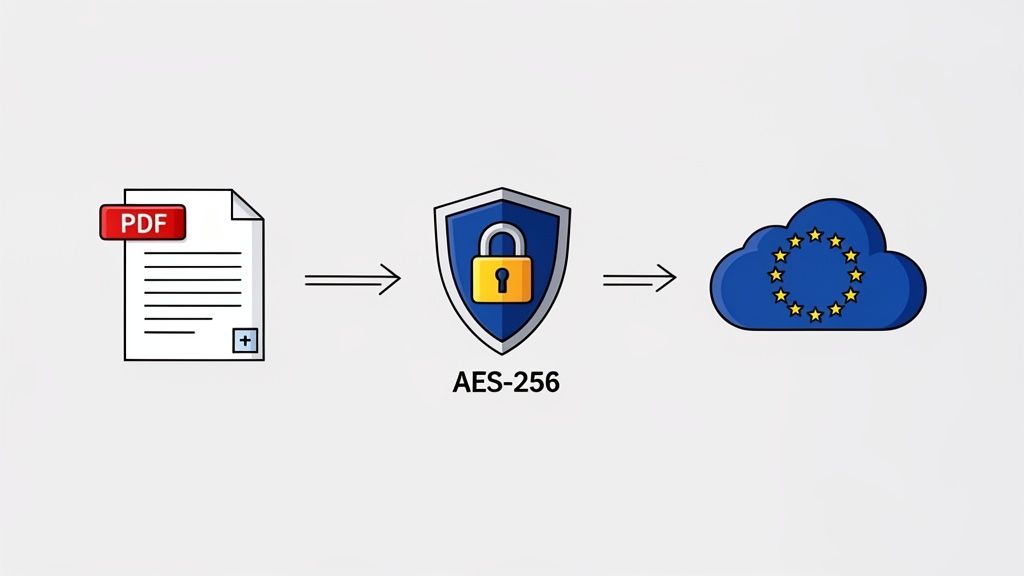
From the moment you upload the file for OCR to the final translated document, the entire process has to be locked down. This means you need to dig into a service's data privacy policy and understand exactly what happens to your information. For any business that takes its data seriously, a security-first platform like Mintline is the only way to go.
Your Security Checklist for Translation Tools
Before you even think about uploading a sensitive file, you have to do your homework and make sure the platform meets modern security standards. A lot of people are focused on maintaining the original layout, and it's true, knowing how to translate scanned PDFs without losing formatting is crucial. But security is an equally important part of that equation.
Here’s a practical checklist I use to vet any third-party service:
- End-to-End Encryption: I look for AES-256 encryption. It’s the same standard banks use, and it means your data is unreadable while it's being uploaded and while it's sitting on their servers.
- Clear Data Privacy Policy: Does the company sell or share your data? Reputable services will have a strict policy against this, ensuring your information stays yours.
- EU-Based Data Storage: For anyone operating in the Netherlands or elsewhere in the EU, this is a big one for GDPR compliance. Storing data within the EU means it's protected by some of the strongest privacy laws on the planet.
- Secure Deletion Policy: Can you permanently delete your files when you're done? You should always have complete control over your data's entire lifecycle.
This isn't just about being cautious; the data backs it up. According to Eurostat, 45% of EU citizens, including many in the Netherlands, are worried about their data's confidentiality when using online services.
Imagine you're a freelancer juggling scanned Dutch bank statements and receipts from foreign vendors. This isn't just a statistic to you. Getting it wrong with GDPR could lead to fines of up to €20 million or 4% of your annual turnover. Suddenly, a simple translation task becomes a massive financial liability.
Choosing a translation service is as much a security decision as it is an operational one. Prioritising platforms with transparent, robust security protocols protects your business, your clients, and your peace of mind.
At the end of the day, any tool that touches your financial documents needs to treat that data with the same care you do. Stick to these principles, and you can translate sensitive documents with confidence, knowing your security is never compromised.
FAQs: Your Scanned PDF Translation Questions Answered
When you're dealing with scanned documents, the path to a clear translation isn't always straightforward. It's natural to have questions, especially when you need a reliable workflow for important business files. Let's break down some of the most common things people ask when they need to translate a PDF scan.
Can I Really Translate a Scanned PDF for Free?
Technically, yes, but it’s a manual and disjointed process. You’d have to find a free OCR tool to pull the text out of your scanned image first. Then, you'd take that block of raw text and paste it into a free service like Google Translate.
The trade-offs are huge, though. You'll lose 100% of your original formatting, ending up with just a plain wall of text. Even more critically, uploading any sensitive business or personal information to free online tools is a serious security gamble. For something quick and non-confidential, it might be fine in a pinch. For professional work, a secure, all-in-one platform is the only sensible choice.
How Do I Make Sure Technical or Legal Terms Are Translated Correctly?
This is a fantastic and crucial question. Standard machine translation often stumbles over specialised jargon, and a mistranslated legal clause or technical spec can have serious consequences. The meaning can shift completely, creating a real business risk.
The best way to guarantee accuracy is to use a professional translation platform that lets you manage your own terminology. These tools often have features like custom glossaries, allowing you to create a database of your key terms and define exactly how they should be translated every single time. This ensures absolute consistency and precision.
For mission-critical documents—think legal contracts, engineering plans, or medical records—I always recommend a hybrid approach. Get a high-quality AI tool to do the heavy lifting for the first draft, which saves a massive amount of time. Then, have a native-speaking human expert review and refine the output. This gives you the best of both worlds: the speed of AI and the nuanced eye of a professional.
What's the Best Way to Translate a Whole Batch of Scanned PDFs at Once?
Going through scanned documents one by one is a recipe for frustration and wasted time. It just doesn't work when you have a stack of files to get through, like a batch of invoices from an overseas supplier. For that, you need a system designed for bulk processing.
Your most efficient route is a dedicated document translation service that allows for batch uploads. Platforms like Mintline are built to automate the entire process from beginning to end.
For every file you upload, the system will automatically:
- Run a high-quality OCR scan to digitise the text.
- Translate the content with a sophisticated AI engine.
- Rebuild the document, keeping the original layout and formatting intact.
The key here is to find a tool with top-notch OCR and layout preservation. Getting this right from the start saves you countless hours of manual clean-up and reformatting on the other side.
Ready to stop chasing receipts and manually translating scanned documents? Mintline automates the entire process, from OCR to data extraction, so you can close your books faster and with greater accuracy. Discover how our secure, AI-powered platform can transform your financial workflow at https://mintline.ai.