
A Guide to Accounts Payable Automation for Modern Businesses
Discover how accounts payable automation streamlines invoice processing, cuts errors, and boosts cash flow. Learn the benefits and how to get started.
Accounts payable automation is all about using smart software to handle supplier invoices with as little hands-on effort as possible. It takes the old, manual slog of entering invoices, matching them up, and cutting cheques, and turns it into a smooth, digital process that saves a ton of time and cuts down on mistakes. For freelancers and small businesses, this is a game-changer for getting a real grip on your finances.
From Manual Chaos to Digital Clarity
Think of your old accounts payable process like a chaotic, overflowing filing cabinet. Every invoice is a piece of paper you have to manually log, stuff into the right folder, and remember to pull out when it's due. It’s slow, and it’s so easy for things to go wrong—a lost invoice, a typo in the amount, a forgotten payment deadline. One simple mistake can lead to late fees, unhappy suppliers, and a completely skewed picture of your finances.
This is the reality for so many freelancers and small business owners who are stuck juggling spreadsheets and piles of receipts. You spend hours you don't have chasing down documents, painstakingly typing in data, and worrying about what you might have missed. It's an administrative black hole that sucks up time and energy that should be going into building your business.
The Power of Automated Workflows
AP automation is like trading that clunky filing cabinet for a powerful, intelligent financial assistant. Instead of you doing the work, it instantly finds, categorises, and tracks every single invoice. The technology reads the important data right off the invoice, matches it to the right bank transaction, and gets it ready for review without you having to do a thing.
For anyone using Mintline, this is as simple as dragging and dropping a bank statement. That single action sets our whole intelligent system in motion. Our software links every transaction to its matching receipt, transforming what used to be hours of mind-numbing admin into a few minutes of quick review. This isn't just about saving time; it's about taking back control. If you want to dive deeper into the basics, check out our guide on the definition of accounts payable.
By moving from manual data entry to an automated system like Mintline, small businesses can free up countless hours, boost accuracy, and get a live, up-to-the-minute view of their spending. That's what lets you make smarter financial decisions.
This is more than just a passing trend. In the Netherlands, the market for this kind of automation is set to grow massively through 2031. For freelancers and small teams, these tools can slash the time spent on manual AP work by up to 70%. Better yet, Dutch companies that have made the switch report a 62% drop in manual errors—proof that it really works. You can read more about the Dutch market growth on 6wresearch.com.
Manual vs Automated Accounts Payable at a Glance
To really see the difference, let’s put the old way and the new way side-by-side. This table shows just how much changes when you move from a manual, paper-based system to an automated one like Mintline.
| Process Step | Manual AP (The Old Way) | Automated AP (The Mintline Way) |
|---|---|---|
| Invoice Arrival | Received via post or email; requires manual sorting and printing. | Invoices are captured automatically from emails or uploads. |
| Data Entry | Someone has to type all the details into a spreadsheet or system. | OCR technology reads and extracts all data instantly. |
| Transaction Matching | Manually hunt through bank statements to find matching payments. | AI automatically matches invoices to bank transactions. |
| Approvals | Chase managers for physical signatures or email approvals. | Workflows automatically route invoices to the right person for a digital click-to-approve. |
| Record Keeping | Physical filing, prone to loss, damage, and difficult searches. | All documents are stored securely in the cloud, fully searchable and audit-ready. |
The contrast is clear. Automation removes the friction and risk at every single step, giving you a system you can actually trust.
At its core, accounts payable automation is a specific flavour of a bigger idea: making business processes run themselves. To get a wider view of how this can apply to other parts of a business, it's worth exploring these business process automation examples.
So, How Does AP Automation Technology Actually Work?
To really get what makes accounts payable automation so powerful, you have to look under the bonnet. It isn't just one magic button; it's a suite of smart technologies working in concert to create a smooth, predictable financial workflow. The whole system is built on a few core components that take a document from arrival all the way to final payment, turning a notoriously messy manual process into a clean, efficient digital one.
This diagram gives you a bird's-eye view of the core workflow, showing how documents are captured, matched, and finally paid, all powered by that central automation engine.
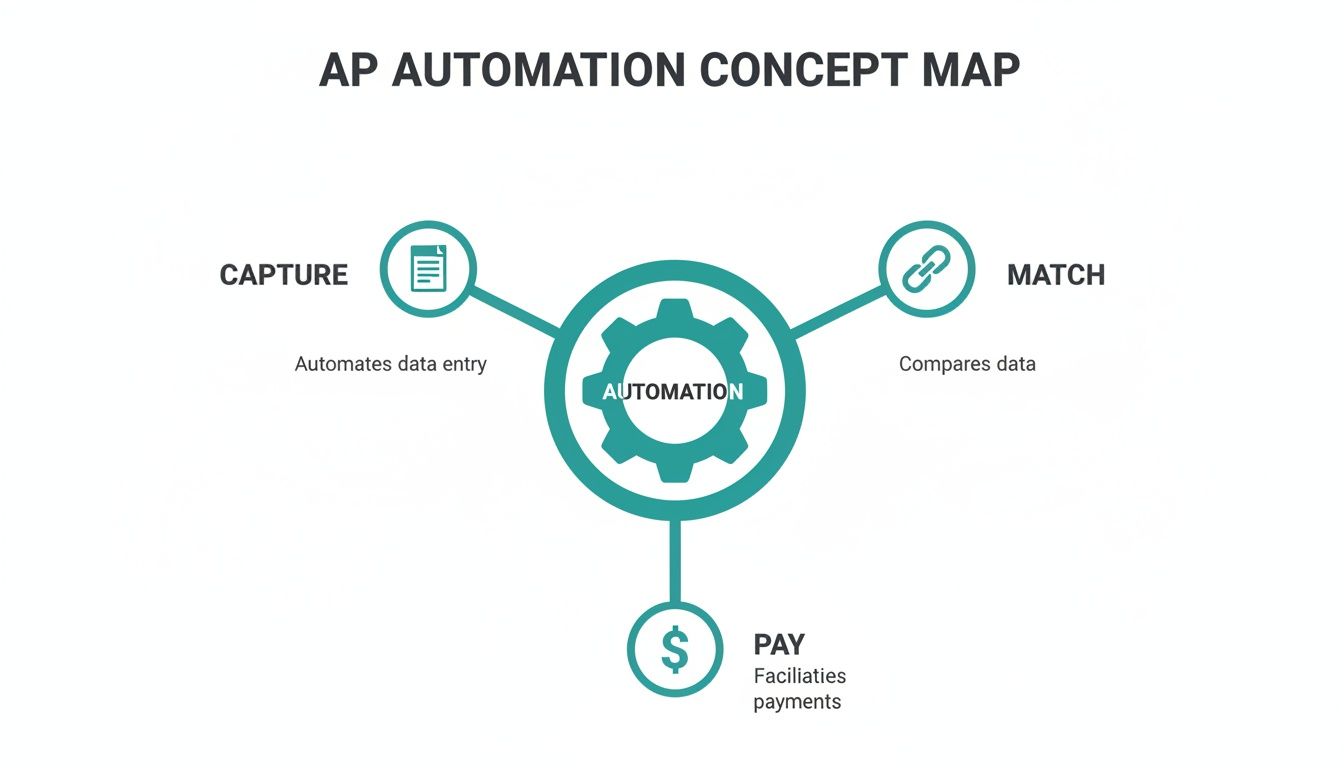
What the picture shows is that the real magic isn't in any single step, but in how they all link together to create a cohesive, largely hands-free process.
AI-Powered Data Capture
First things first: you need to get the information off invoices and receipts and into your system. This is where Optical Character Recognition (OCR) enters the picture. Think of it as a pair of digital eyes that can read text from any document—a PDF from a supplier, a photo of a paper receipt, you name it.
But modern platforms like Mintline go way beyond just reading text. They use artificial intelligence to actually understand the context of that data. Our software doesn’t just see "15/07/2024"; it knows that's the invoice date. It doesn't just see "€250.00"; it recognises that as the total amount due.
This intelligent capture is the foundation of the whole system. It completely removes the single most time-consuming and error-prone part of the AP cycle: manual data entry. If you want to dive deeper into the nuts and bolts, you can learn more about intelligent document processing in our detailed guide.
Intelligent Matching
Once the data is in, the next puzzle is to connect it to the right transaction. In a manual world, this is where someone spends hours squinting at screens, painstakingly comparing an invoice to a purchase order or a receipt to a line item on a bank statement. It's tedious, and it's where mistakes quietly creep in.
This is where Mintline really shines. Our platform uses AI to perform intelligent matching, automatically linking documents to their corresponding bank transactions. The system zeroes in on key data points to find the perfect match.
- Vendor Name: It checks the supplier name on the invoice against the transaction description.
- Amount: It looks for an exact monetary match between the document and the bank record.
- Date: It cross-references the invoice date with the transaction date to lock in the connection.
What used to be hours of administrative drudgery becomes a quick review. Instead of hunting for matches, your team is simply confirming the system's suggestions.
By automatically linking every transaction to its source document, intelligent matching creates an unbreakable financial record. This not only saves an incredible amount of time but also builds a reliable, audit-ready trail for every single expense.
Automated Workflows And Approvals
With the invoice captured and matched, it needs to get approved. In the old days, this meant physically walking a piece of paper to a manager's desk or getting lost in endless email chains. It was a massive bottleneck.
Automated workflows digitise this entire sequence. You can set up custom rules that automatically send invoices to the right person based on criteria like the amount, department, or vendor. For instance, an invoice over €1,000 might automatically go to a department head, while smaller expenses get approved on the spot. Approvers get a neat notification, review the matched documents, and sign off with a single click.
Seamless Software Integration
The final piece of the puzzle is integration. A good AP automation tool doesn't live on an island; it has to connect seamlessly with your core accounting software. This is critical for ensuring all approved and paid invoices are automatically synced, creating a single, reliable source of truth for your company's finances.
This direct link means no more manual exports and imports—a process that introduces yet another chance for human error. When your AP platform, like Mintline, talks directly to your accounting system, you can close your books faster and with far more confidence in the numbers.
The Real-World Benefits of Automating Your AP Process
Let's move past the theory and talk about what AP automation actually does for your business. The benefits aren't just abstract ideas on a PowerPoint slide; they are tangible, measurable improvements that hit your efficiency, accuracy, and ultimately, your bottom line. Bringing in a system like Mintline isn't just a tech upgrade—it's about fundamentally changing how your business manages its financial pulse.
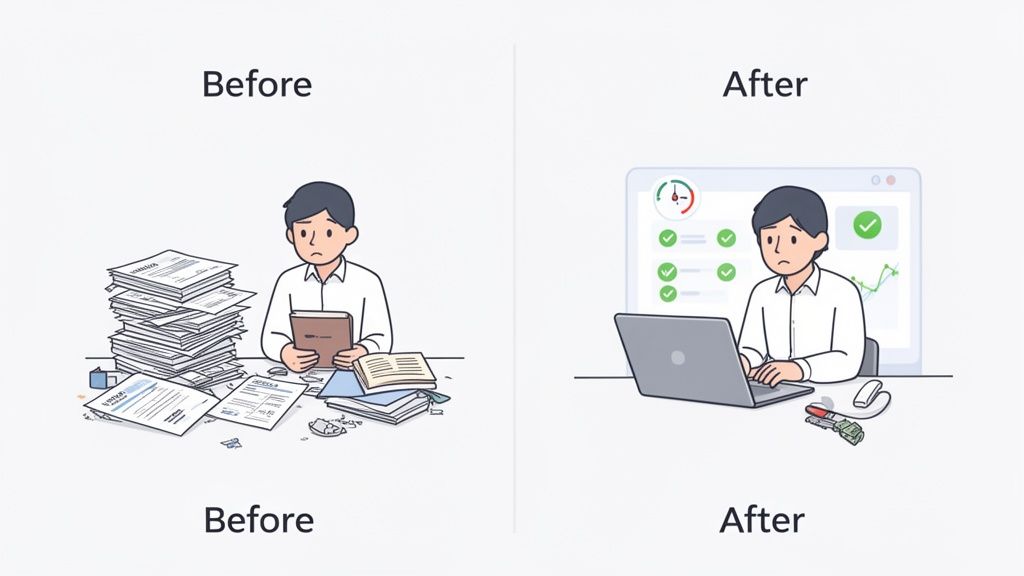
The first thing you’ll notice is how much manual work simply disappears. Instead of getting bogged down in repetitive data entry, your team can finally focus on oversight and strategy. That’s where their real value lies.
Reclaim Your Time and Focus
Think about the classic month-end scramble for a small business owner. Hours spent hunched over a desk, painstakingly matching a mountain of invoices to lines on a bank statement. Every single document needs to be manually keyed into a spreadsheet, a process that’s as slow as it is soul-destroying.
Now, picture this instead: that same business owner drags and drops a PDF statement into a platform like Mintline. The system instantly pulls out the transactions and uses AI to match them with the right receipts. What used to be hours of mind-numbing work becomes a few minutes of quick, strategic review. This isn't just about saving time; it's about reclaiming the energy to actually grow the business.
Dutch businesses are already living this reality. Top-performing teams in the Netherlands are now processing invoices in just 3.1 days, a massive leap from the 17.4-day average for those still stuck with manual methods. This isn't a fluke. It's driven by a clear understanding of the payoff, with 62% of organisations adopting automation specifically to work faster and slash errors. And with 74% planning to use AI in their AP process by 2025, the direction is clear. You can dig into more of these AP automation statistics and trends at Quadient.com.
Eliminate Costly Human Errors
Let's be honest, no matter how meticulous you are, manual data entry is prone to mistakes. A misplaced decimal point or a couple of swapped digits can easily lead to overpayments, paying the same bill twice, or missing an invoice altogether. These aren't just accounting headaches; they damage your cash flow and can sour relationships with your suppliers.
Automation is your best defence against these costly slip-ups. By using OCR to read and capture data directly from invoices, the risk of human error is practically gone. Mintline's system doesn't get tired or distracted; it just processes information with cold, hard precision. This ensures every payment is for the right amount, sent to the right vendor, right on time.
Gain Real-Time Cash Flow Visibility
One of the biggest frustrations with manual AP is that you're always looking in the rearview mirror. When invoices are sitting in a tray on someone's desk or logged in a spreadsheet that only gets updated once a week, you never have a truly accurate picture of your liabilities. It makes smart financial planning feel more like guesswork.
With a centralised system like Mintline, every invoice is captured and categorised the moment it comes in. You get an up-to-the-minute dashboard view of exactly what you owe and when it’s due, allowing you to make much smarter decisions about your cash.
This real-time visibility is a game-changer for a few key reasons:
- Better Budgeting: You can forecast your outgoings with far greater accuracy.
- Strategic Payments: You can decide which bills to pay early to grab a discount or which to hold onto until the due date to manage cash reserves.
- Tighter Financial Control: You can see exactly where your money is going at any given moment, without having to wait for month-end reports to catch up.
Simplify Audits and Compliance
For most businesses, the word "audit" causes immediate stress. It often kicks off a chaotic scramble to find the right documents. Tracking down one specific invoice, along with proof of its approval and payment, can mean digging through dusty filing cabinets or sifting through thousands of old emails.
AP automation turns this ordeal into a simple, straightforward task. Every invoice, its corresponding transaction, the entire approval history, and the payment record are all linked together and stored in a secure digital archive like Mintline. When an auditor asks for documentation, you can pull it up with a quick search. In seconds. This creates a clean, undeniable audit trail that makes compliance checks almost effortless.
Your Roadmap to Implementing AP Automation
Bringing a new system into the fold can feel daunting, but shifting to accounts payable automation doesn’t have to be a nightmare. With a sensible plan, you can make the transition smooth, successful, and valuable right from the get-go. This roadmap will walk you through a practical, step-by-step approach to get your team ready and ensure your new system delivers.
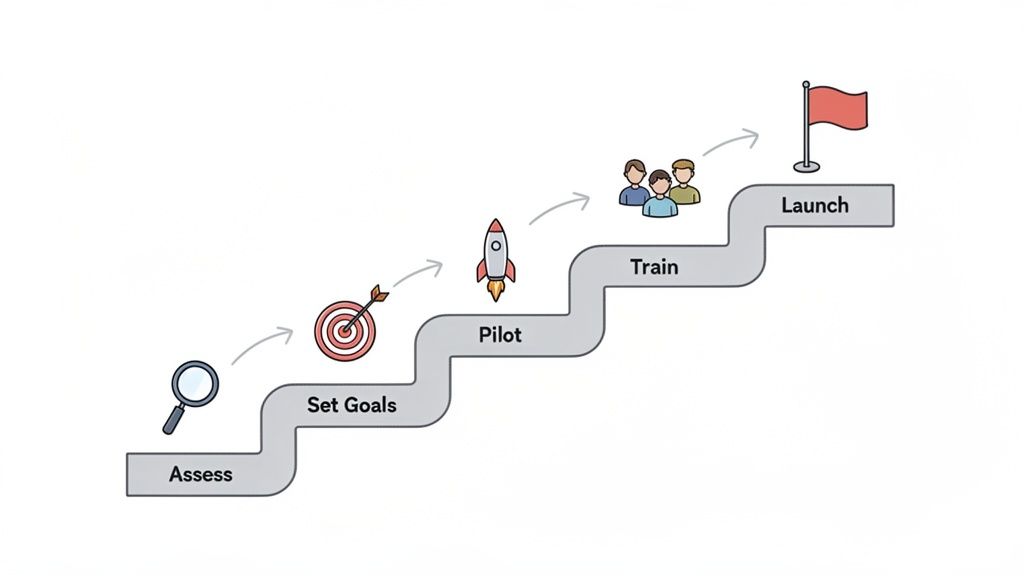
The journey doesn't start with picking software; it starts with taking a good, hard look at how you do things now. The goal is to move from manual chaos to organised efficiency, and that begins with pinpointing today's friction points.
Step 1: Assess Your Current AP Process
Before you can fix your process, you have to understand precisely where it’s falling apart. Take some time to map out your entire accounts payable workflow, from the moment an invoice hits your inbox to the final payment confirmation.
Get your team together and ask some tough questions:
- Where do we lose the most time? Is it the mind-numbing manual data entry, the endless chase for approvals, or the painstaking job of matching receipts to bank statements?
- What are our most frequent mistakes? Are you constantly dealing with duplicate payments, keying in wrong amounts, or missing out on early payment discounts?
- How much is this process actually costing us? Don’t just guess. Factor in the hours your team spends on these manual tasks. Remember, studies show manual invoice processing can cost upwards of €15 per invoice.
This assessment provides a crucial baseline. You’ll walk away with a specific list of pain points that accounts payable automation is built to solve, making it much easier to see where you'll get an immediate win.
Step 2: Define Your Goals and Success Metrics
Now that you know what's broken, you can set clear, measurable goals for what you want to achieve. Vague targets like "become more efficient" won't cut it. You need to get specific.
Your goals might look something like this:
- Cut invoice processing time from an average of 15 days down to just three.
- Completely eliminate late payment fees within the first three months.
- Reach an 80% automation rate for receipt matching within six months—a metric you can easily track in a platform like Mintline.
These solid targets will guide your implementation and give you a clear-cut way to measure your return on investment down the road.
Step 3: Prepare Your Team and Data
A successful rollout is as much about people as it is about software. Now is the time to bring your team into the conversation, focusing on how automation will empower them, not replace them. Frame this change as a shift away from tedious, low-value work and towards more strategic financial analysis.
Change management is critical. The goal is to shift your team's focus from being data processors to financial strategists. Automation frees them up to analyse spending, manage cash flow, and find cost-saving opportunities.
The other half of the puzzle is getting your data in order. Gather your key supplier information, historical invoices, and bank statements. A clean dataset makes the transition to a new system like Mintline incredibly smooth, as the AI will have accurate information to learn from immediately. This step is also a great chance to get a holistic view of your financial operations, which we explore further in our guide to the procure-to-pay process.
Step 4: Start with a Pilot Project
Don’t try to boil the ocean. Instead of a massive, company-wide launch, start with a small, manageable pilot project. Choose a single department or a specific group of high-volume suppliers to test the new system.
This approach has some major advantages:
- It lets you work out any kinks in a low-risk environment.
- Your team gets to learn the new system without feeling completely overwhelmed.
- A successful pilot creates internal champions and builds positive momentum for the full rollout.
By starting small, you can prove the value of accounts payable automation quickly. That success story makes it much easier to get enthusiastic buy-in from everyone else in the organisation.
Choosing the Right AP Automation Solution
Picking the right partner for your accounts payable automation is a big decision, one that will define how your finance team operates for years. It's easy to get distracted by flashy features, but the real value lies in the fundamentals: security, integration, and how easy it is for your team to actually use. Nailing these three areas is the key to finding a solution that doesn't just work, but works for you.
When you get this choice right, you're not just buying software; you're building a reliable, efficient AP engine that can keep pace as your business grows.
Prioritise Rock-Solid Security
Let's be blunt: when you're dealing with company money, security isn't just a feature—it's everything. Your AP platform will hold the keys to the kingdom: supplier invoices, bank details, and payment data. This makes it a very attractive target for cybercriminals, so your first and most important questions for any vendor should be about how they keep your information safe.
Don't settle for vague assurances. You need to see specific, robust security measures in place. For example, at Mintline, we secure all customer data with AES-256 encryption—that’s the same standard trusted by banks and governments around the world. We also make sure all data is stored on secure servers right here in the European Union, which means it’s protected by some of the strictest data privacy laws on the planet.
A vendor’s commitment to security is a direct reflection of their commitment to your business. Vague promises aren’t good enough. Demand clear answers on their encryption standards, data storage policies, and any compliance certifications they hold.
Ensure Seamless Integration Capabilities
An AP automation tool that can't talk to your other financial software isn't an asset; it's a roadblock. The whole point of automation is to create a single, connected system where information flows smoothly from one place to another. If your team is stuck manually exporting and importing data, you've just traded one tedious task for another.
Think about your entire financial tech stack. Your new AP software needs to connect flawlessly with your accounting package, but what about the future? Consider how it will work with broader integrated ERP systems such as Microsoft Dynamics 365 as your company expands. A platform with strong, pre-built integrations is your best bet for maintaining data accuracy and saving countless hours on reconciliation.
Demand an Intuitive User Experience
Even the most powerful software is worthless if your team can't figure out how to use it. The best AP automation platforms are designed for real people, turning complex financial workflows into simple, logical steps. A clean, intuitive interface means less time spent on training and more time getting work done.
Look for thoughtful design touches that make life easier, like Mintline’s simple drag-and-drop feature for uploading bank statements. This kind of user-focused design means your team can hit the ground running and see the benefits of automation straight away, without needing a week of training or constant calls to tech support. The system should feel like a helpful colleague, not another frustrating problem to solve.
Finally, think about tomorrow. The solution that's a perfect fit for your two-person startup needs to have the muscle to handle the workload of a fifty-person team. Choosing a scalable platform from the start means you won't have to go through the pain of switching systems right when your business is taking off.
Key Features Checklist for AP Automation Software
To help you cut through the marketing noise and compare vendors effectively, we've put together a checklist of essential features. Use this to guide your conversations and make sure you're asking the right questions.
| Feature | Why It Matters | Questions to Ask Vendors |
|---|---|---|
| OCR & Data Extraction | Automatically reads invoices, saving hours of manual data entry and reducing human error. | What is the accuracy rate of your OCR technology? Does it handle different invoice formats and languages? |
| AI-Powered Matching | Intelligently matches invoices to purchase orders and receipts, flagging discrepancies before payment. | Can your AI handle partial matches or line-item level details? Does it learn from corrections over time? |
| Customisable Workflows | Allows you to build approval chains that mirror your company’s unique processes and authorisation levels. | How easy is it to set up and modify approval workflows? Can we create rules based on invoice amount, supplier, or department? |
| ERP/Accounting Integration | Ensures a single source of truth for financial data by syncing seamlessly with your existing systems. | Do you have a pre-built integration for our accounting software? Is it a one-way or two-way sync? What data is synchronised? |
| Supplier Portal | Gives suppliers a self-service option to check invoice status, reducing enquiries to your AP team. | Is there a portal for our suppliers? What information can they access? Is there any additional cost for this feature? |
| Mobile App & Approvals | Enables budget holders to review and approve invoices on the go, preventing bottlenecks in the process. | Do you offer a mobile app for both iOS and Android? Can approvers view the original invoice directly from the app? |
| Reporting & Analytics | Provides visibility into spending patterns, supplier performance, and team efficiency to inform decisions. | What standard reports are included? Can we create custom reports? Can data be easily exported? |
| Security & Compliance | Protects sensitive financial data and ensures you meet regulatory requirements like GDPR. | What encryption standards do you use? Where is our data stored? What certifications (e.g., ISO 27001) do you hold? |
This checklist isn't exhaustive, but it covers the core functionality that delivers the most impact. A vendor who can confidently answer these questions is one worth considering.
Measuring Success and Avoiding Common Pitfalls
So, you’ve decided to automate your accounts payable. That’s a huge step. But how do you prove it was the right one? To really understand the return on your investment, you need to look past the obvious time savings and start tracking specific Key Performance Indicators (KPIs). These numbers give you concrete proof of the value you’re getting and shine a light on where you can get even better.
Measuring success isn't just for a pat on the back. It’s about making smarter decisions backed by real data. When you track the right things, your AP department stops being just a cost centre and starts becoming a source of strategic insight for the whole company.
Key Performance Indicators That Matter
Before you can track progress, you have to define what "good" looks like. Forget gut feelings. Focus on these tangible metrics to see the real-world impact of your automation efforts.
- Invoice Processing Time: This is the big one. How long does it take, from the moment an invoice lands in your inbox until it’s fully paid? A sharp drop here is usually the first win you'll see with automation.
- Cost Per Invoice: It's a simple calculation: divide the total cost of your AP department (salaries, software, etc.) by the number of invoices you process. Automation should send this number plummeting. We've seen businesses slash this cost by 80% or more.
- Overall Automation Rate: This is a fantastic metric for understanding how much of your process is truly hands-off. In a platform like Mintline, for example, you can see this right on your dashboard—it shows the percentage of transactions automatically matched to receipts. Pushing this number higher should be a constant goal.
- Early Payment Discount Capture Rate: Are you leaving money on the table? Many suppliers offer a discount for paying early. This KPI tracks how often you actually capture those savings, effectively turning your AP team into a function that generates profit.
Tracking these KPIs changes the conversation from, "I think we're faster now," to, "We've cut our invoice cycle time by 12 days." That kind of hard data is exactly what you need to show stakeholders—and your own team—the real value of your investment.
Sidestepping Common Implementation Hurdles
While the benefits are massive, the road to automation isn’t always perfectly paved. Knowing where the common bumps are can help you steer clear of the headaches that can derail an otherwise great project. A little proactive planning goes a long way.
Interestingly, the biggest challenges often have less to do with the technology itself and more to do with people, processes, and the quality of your data.
- Overcoming Team Resistance: Let’s be honest, change can be scary. Some on your team might worry that automation is coming for their jobs. It's crucial to frame this shift for what it is: an opportunity to ditch mind-numbing data entry and focus on more valuable work like financial analysis and vendor strategy.
- Dealing with Poor Data Quality: Your new automation system is only as smart as the information you feed it. If your supplier records are a jumble of duplicates and out-of-date contacts, you’re setting yourself up for failure. Make it a priority to clean up your vendor master file before you go live.
- Choosing a System That Can't Grow: The platform that works for a tiny startup won't cut it for a business that's scaling quickly. Be careful not to pick a rigid solution that can't adapt. You need a platform built for growth, one that can handle more invoices and more complex approval workflows as your company expands.
Your Questions About AP Automation, Answered
Jumping into any new technology can feel like a big step, even with a solid plan in place. It’s natural to have a few lingering questions. To clear things up and help you feel confident about automating your accounts payable, we've tackled some of the most common ones we hear.
Is AP Automation Just for Big Companies?
Not anymore. It used to be that only massive corporations with hefty budgets could afford this kind of tech, but cloud-based tools have completely levelled the playing field. Solutions like Mintline are designed from the ground up for freelancers, start-ups, and small businesses.
Flexible pricing plans, often with free starting tiers, mean that powerful automation is within everyone's reach. Now, a business of any size can unlock the same time savings, accuracy, and clear financial insights that were once exclusive to the big players.
How Secure is My Financial Data?
This is a big one, and rightly so. Security should be at the very top of your checklist when evaluating any financial tool. Any vendor worth your time will be upfront about how they protect your sensitive information.
For example, at Mintline, we use AES-256 encryption to safeguard your data—that’s the same standard used by major banks and governments. All information is stored on secure AWS servers within the EU, ensuring we meet strict data privacy laws. We have a simple, firm policy: we never share your data. Your financial information stays yours, period.
The goal of accounts payable automation is to empower your finance professionals, not replace them. It elevates their role from data processor to strategic advisor by freeing them from repetitive, low-value tasks.
Will This Make My Bookkeeper Redundant?
This is a common worry, but the answer is a firm no. Think of automation as a powerful assistant for your finance team, not a replacement. By handling the tedious, soul-crushing tasks like manual data entry and chasing down receipts, it gives your bookkeeper their time back.
Instead of drowning in paperwork, they can focus their skills on work that truly matters—like analysing spending patterns, forecasting cash flow, or finding new ways to save the business money. It’s about shifting their role from repetitive processing to strategic guidance.
What if My Suppliers Still Send Paper Invoices?
That’s a reality for most businesses, and any good AP automation system is built to handle it. You don't have to force everyone to go digital overnight. Modern platforms offer simple ways to connect your physical and digital worlds.
Most systems provide a unique email address where suppliers can send PDF invoices, which are then processed automatically. For paper receipts or invoices you receive in person, you can usually just snap a quick photo with a mobile app. The system's OCR technology takes it from there, reading the document and pulling out all the important data just as if it were a digital file.
Ready to stop chasing receipts and start automating your accounts payable? See how Mintline can transform hours of monthly admin into just a few minutes of review. Get started for free today.