
A Practical Guide to Automate Accounts Payable
Learn how to automate accounts payable with this practical guide. Streamline your workflow, cut costs, and boost efficiency for your Dutch business.
Automating accounts payable means swapping the manual grind of data entry, invoice approvals, and payment runs for a smarter, software-driven workflow. For modern businesses, this often means using a platform like Mintline to automatically capture invoices, match them to bank transactions, and sync everything with your accounting software. It’s about boosting efficiency, eliminating errors, and gaining real-time financial control.
This guide provides a practical playbook for making the switch smoothly and seeing immediate benefits.
Why Manual AP Is Costing Your Business More Than Just Time
Does month-end bookkeeping feel like a recurring nightmare? For many businesses, the scene is all too familiar: a desk buried under a mountain of receipts, hours spent squinting at spreadsheets, and that constant, nagging worry about a missed payment deadline. This old-school approach to accounts payable isn't just stressful; it's a silent drain on your most precious resources: time, money, and focus.

If this sounds familiar, you're not alone. Believe it or not, over 50% of finance departments are still stuck in the muck of manual AP. This is happening even though a whopping 76.5% of financial professionals are calling for more investment in automation. So, what’s the hold-up? For nearly a third of them, it’s a simple knowledge gap. You can discover more insights about these finance trends and see the full data breakdown for yourself. This gap shows a massive opportunity for businesses ready to ditch outdated methods.
The Hidden Costs of Sticking to Spreadsheets
The trouble with manual AP goes way beyond the time it consumes. It creates a domino effect of problems that can seriously hold your business back. Every minute spent keying in data or chasing an invoice is a minute you're not spending on client work, big-picture strategy, or actually growing your business.
Just think about these common pain points that manual processes inflict:
- High Risk of Human Error: One tiny typo can lead to overpayments, duplicate payments, or messed-up financial records. Unravelling that kind of mistake can take hours.
- Strained Vendor Relationships: Late payments caused by a disorganised workflow don’t just hurt your reputation; they can lead to suppliers giving you less favourable terms down the line.
- Lack of Financial Visibility: When your payables info is scattered across emails, spreadsheets, and paper files, you have no real-time view of your cash flow or what you owe. You're flying blind.
- Scalability Nightmares: As your business grows, so does the invoice volume. A manual system quickly becomes a bottleneck, leading to burnout and chaos.
The real cost isn't just the salary you pay for administrative work; it’s the opportunity cost. It’s the brilliant strategic projects that never get off the ground because your team is drowning in paperwork.
To give you a clearer picture, let's break down the differences side-by-side.
Manual AP vs Automated AP: A Quick Comparison
| Aspect | Manual Accounts Payable | Automated Accounts Payable (with Mintline) |
|---|---|---|
| Process | Manual data entry, paper-based approvals, physical invoice storage, manual payment scheduling. | Automatic data capture (OCR), digital approval workflows, centralised cloud storage, scheduled and bulk payments. |
| Time Spent | 20-40 hours per month for a typical SMB, heavily dependent on invoice volume. | 2-5 hours per month. Focus shifts from data entry to review and approval. |
| Cost Per Invoice | Often between €10-€20, factoring in labour, printing, and storage. | Typically under €5, with costs decreasing significantly as volume increases. |
| Accuracy | Prone to human error (typos, duplicates, lost invoices). Error rates can be as high as 3-5%. | Near-perfect accuracy with OCR and three-way matching. Error rates drop to below 0.5%. |
As you can see, the contrast is stark. The shift to automation isn't just an upgrade; it's a fundamental change in how you manage your finances.
Luckily, there’s a straightforward solution. Automating your accounts payable with a tool like Mintline isn't about wrestling with complex, enterprise-level technology. It’s about putting a simple, organised workflow in place that finally brings order to the chaos. This guide will walk you through the exact steps to automate accounts payable, turning a chore into an efficient, value-adding part of your business.
Preparing for a Smooth Switch to Automation
Jumping headfirst into new software without a solid plan is a recipe for frustration. Real success in automating your accounts payable starts with good preparation—think of it as drawing up the blueprints before you start building. This is your pre-flight checklist, the groundwork that ensures when you plug in a tool like Mintline, the whole process is smooth and you see the benefits right away.
A common pitfall is treating automation like a magic wand that will instantly fix messy, undefined processes. The truth is, the software is only as good as the data and rules you give it. Taking the time to get your own house in order first will pay off tenfold down the line.
Map Your Current AP Process to Find the Pain Points
Before you can fix your accounts payable workflow, you have to know it inside and out. Start by grabbing a whiteboard or opening a simple flowchart tool and mapping out your current process, from the second an invoice lands in your inbox to the moment the payment is confirmed.
For a freelance designer, this might be pretty straightforward: an invoice for a software subscription arrives via email, they manually log it in a spreadsheet, and then schedule a bank transfer. A small marketing agency, on the other hand, might have a few more steps—a project manager has to approve the invoice, someone enters it into the bookkeeping software, and then it’s batched into a weekly payment run.
As you map this out, start asking some tough questions to find the weak spots:
- Where do things get stuck? Is it always waiting on an approval from the boss? Or does everything grind to a halt when you’re too busy to manually key in a stack of invoices?
- What are the most mind-numbing tasks? Think about all the time you sink into downloading PDFs, typing out line items, or trying to match receipts to bank statements.
- Where do mistakes happen? Are they simple typos from data entry, or have you ever accidentally paid the same invoice twice?
These bottlenecks are exactly what automation is designed to fix. Pinpointing them now gives you a clear "before" snapshot, so you can actually measure your success later on.
Standardise Your Internal Rules of the Road
Once you’ve identified where the problems are, the next step is to create simple, clear rules for everyone to follow. Inconsistent processes are the enemy of effective automation. If invoices are coming in through email, post, and random Slack DMs, you’re creating chaos that no software can efficiently manage.
The goal isn’t to create a rigid, bureaucratic nightmare. It’s about establishing one predictable path for all your payables, which makes automation work seamlessly for the entire team.
Start with your invoice submission and approval policies. A great first step is creating a dedicated email address, something like invoices@yourcompany.com, and making it company policy that all vendors send their bills there. This immediately centralises everything, making it incredibly easy for a system like Mintline to grab and process them. If you're looking for the right tools, you can dive deeper into what makes a complete AP automation solution and how to pick one that fits your needs.
Tidy Up Your Documents and Talk to Your Team
With your process mapped and your new rules in place, the final bit of prep work is about getting organised. This means tidying up your existing financial documents and—this is crucial—letting your team and key vendors know what’s changing.
First, round up all your outstanding invoices, receipts, and payment records. If they’re currently scattered across different email inboxes, network drives, and desktop folders, pull them all into one place. This digital clean-up prevents you from starting your new automated system with a messy backlog. A clean slate makes the initial setup and data migration so much smoother.
Finally, don’t underestimate the power of good communication. Let your team know why you’re making this switch. Focus on the upsides for them: less tedious data entry, faster processing, and fewer errors to chase down. Frame it as a way to make their jobs easier, not harder. A little internal marketing can make all the difference in getting everyone on board with the new, more efficient way of working.
Your Step-By-Step AP Automation Workflow
Right, let's get into the practical side of things—turning all this theory into a real, working system. This is where you'll see exactly how to automate accounts payable, and we'll use a tool like Mintline to make the example tangible. Forget the confusing jargon; we’re focusing on simple, actionable steps that take you from a messy pile of receipts to a clean, organised financial record.
The whole approach is built on a simple premise: your bank transactions are the single source of truth. Every payment that goes out needs a matching document to explain it. Automation simply connects those two puzzle pieces for you, turning hours of painful manual reconciliation into a quick, final review.
Let's walk through how this actually works.
Getting Your Financial Data into the System
First things first, you need to get your transaction data into the platform. With Mintline, you have two very straightforward options designed to fit how you already operate. There’s no complex setup or technical wizardry needed here.
-
Direct Bank Connection: This is the most hands-off way to do it. You can securely link your business bank accounts, and Mintline will automatically pull in your transaction feed in real-time. This sets up a continuous, up-to-date stream of data without you lifting a finger.
-
Drag-and-Drop Statements: If you'd rather not connect your bank directly or have a backlog of historical data to process, no problem. Just download your bank statements as PDFs and drag them into Mintline. Its tech is smart enough to read, extract, and organise every single transaction for you.
This flexibility means you can be up and running in minutes, no matter your comfort level with direct integrations. The key is that once your data is in, the real work of automation can begin.
To get ready for this, you really need to map your current process, standardise your rules, and get your documents in order. This visual guide breaks down that essential groundwork.
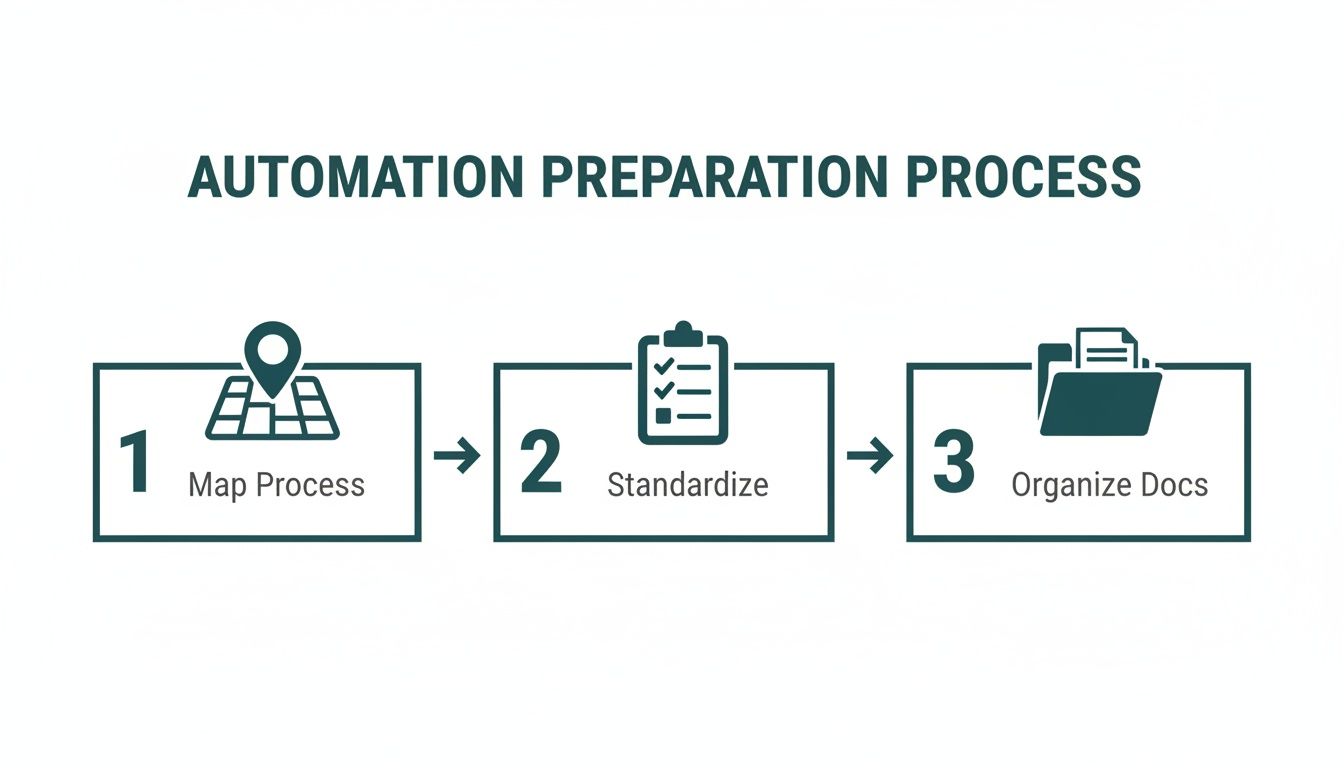
This flow really highlights that successful automation isn't just about the software. It's about building a solid foundation with clear workflows and organised information first.
How Smart Technology Matches Transactions to Receipts
With your transactions loaded, the system’s intelligence takes over. This is the part that condenses hours of manual work into seconds. Mintline’s technology scans each transaction and immediately starts looking for its matching receipt or invoice from the documents you've provided.
Let's say your startup pays a monthly subscription for a design tool. The system sees a recurring payment to "Adobe Systems" for €59.99 on the 15th of the month. It then scans your uploaded documents for an invoice that matches the vendor, amount, and date.
When a likely match is found, it’s presented as a suggestion. Your job instantly shifts from being a data entry clerk to a reviewer. You just confirm the matches are correct with a single click. This fundamentally changes the nature of bookkeeping.
This matching process isn't just a basic text search, either. The platform uses machine learning to get smarter over time, recognising recurring vendors and transaction patterns unique to your business. The more you use it, the faster and more accurate it becomes.
Managing Suggestions and Tracking Your Progress
Of course, not every match will be perfect right out of the gate. That’s why having a clear and intuitive review screen is so important. In Mintline, your transactions are neatly sorted into three buckets: Matched, Unmatched, and Proposed.
This setup gives you an instant, at-a-glance overview of your AP status. You can quickly see which items are done, which need your attention, and which documents are still missing.
If the system suggests the wrong document, you can easily reassign the receipt or link it manually. If a document is missing entirely, the "Unmatched" list effectively becomes your to-do list, showing you exactly which receipts you need to chase down.
For anyone who wants a closer look at the mechanics behind this, you can learn more about automatic document processing and how the underlying technology actually works.
This organised workflow ensures nothing falls through the cracks, leaving you with a complete and audit-ready financial record.
If you want to dive deeper into the specifics of streamlining your AP processes, particularly for businesses handling cross-border payments, this guide on accounts payable automation offers some really valuable insights. Ultimately, this workflow transforms a messy, reactive chore into a proactive, organised, and incredibly efficient part of your business.
Creating a Fully Connected Financial Ecosystem
Automating individual tasks is a great start, but the real power comes when all your financial tools start talking to each other. If your software operates in a vacuum, you’ll just create isolated pockets of information—data silos—and find yourself right back to manual data entry trying to connect the dots. The aim here is to build a truly connected financial ecosystem where information flows effortlessly between your most critical platforms.
This isn’t just about convenience; it’s about creating a single source of truth for your finances. No more bouncing between your bank portal, AP software, and accounting ledger. For any business serious about getting accounts payable automation right, this level of integration is non-negotiable.
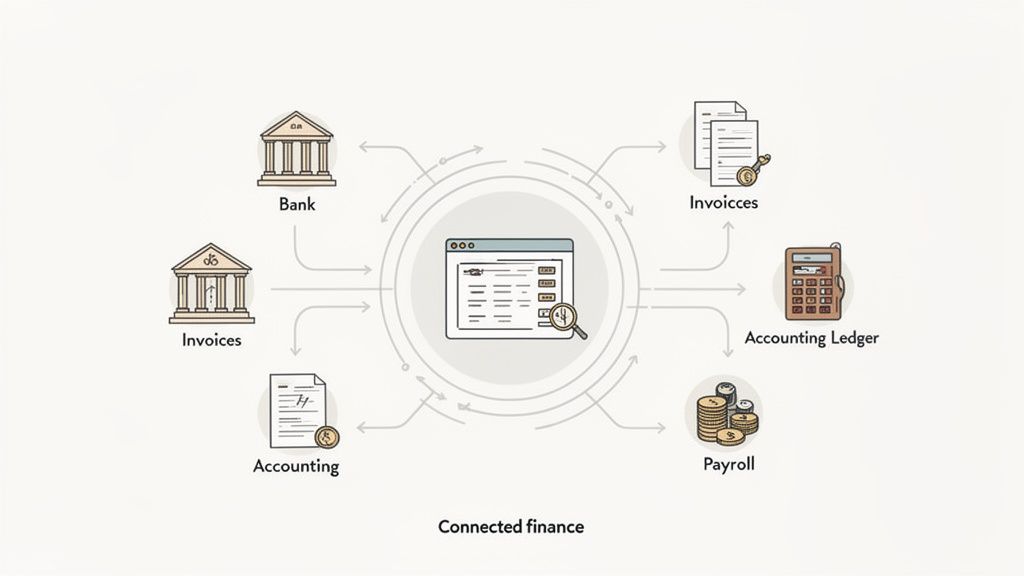
Linking Your AP Automation with Accounting Software
The first and most critical connection is between your AP automation platform and your accounting software. Think of a tool like Mintline as the smart front end—it’s where you capture, match, and organise everything. Your accounting software, whether it's Xero or QuickBooks, is the final destination, the official book of record.
A solid integration makes this hand-off seamless. After you’ve reviewed and matched your invoices and receipts in Mintline, you shouldn't have to touch that data again.
With one click, you should be able to push clean, categorised, and audit-ready records straight into your accounting ledger. This guarantees consistency and seriously cuts down the time you spend closing the books each month.
Imagine an accounting firm managing the books for a dozen startups. Instead of juggling logins for multiple accounting systems, they can process all payables in one central hub. Once done, they just push the finalised data to each client's respective ledger. It’s a game-changer that allows them to handle more clients efficiently and shift their time from tedious data entry to high-value advisory work. When looking for a solution, it's wise to explore a guide on how to choose the right purchase to pay software to make sure it offers the integrations you’ll need.
The Importance of Real-Time Bank Feeds
The other pillar of a connected ecosystem is a live feed from your bank accounts. Uploading PDF statements is a decent starting point, but a direct, real-time connection gives you an up-to-the-minute view of your cash flow.
This link is vital for a few reasons:
- Immediate Transaction Syncing: As soon as a payment clears, the transaction pops up in your AP system, ready to be reconciled with its invoice.
- No More Manual Uploads: It completely gets rid of the need to download and upload files, saving time and preventing you from accidentally missing or duplicating a statement.
- Better Financial Visibility: You always have an accurate picture of your financial position, which is absolutely critical for making smart business decisions on the fly.
This kind of connectivity transforms accounts payable from a backward-looking chore into a forward-looking strategic function. It gives you the data you need, precisely when you need it.
Preparing for an AI-Driven Future
The tools connecting these systems are getting smarter every day. While today’s AP automation has made incredible progress, we're still in the early days of what artificial intelligence (AI) can do for most businesses. In fact, some research shows that only 7% of companies are currently using AI for spend management, but a whopping 40% plan to get on board within the next year.
As technology evolves, it pays to understand what’s coming next. You can find some great resources that outline the future of AI in financial processes and how it will continue to reshape business operations. By building an integrated system today, you’re laying the groundwork to adopt these more advanced, proactive AI tools tomorrow. It’s how you’ll keep your business efficient and competitive for years to come.
How to Measure Your Automation Success
Putting a new system in place is one thing, but proving it’s actually worth the effort is another game entirely. Once you've automated your accounts payable, how can you be certain the investment is paying off? The good news is that success isn't just a vague feeling of being more organised—it's something you can measure with cold, hard data, often pulled straight from a real-time dashboard in a tool like Mintline.
Moving from gut feelings to tangible numbers is non-negotiable. This data-driven approach is what lets you justify the spend, pinpoint where you can get even better, and show any founder or finance lead the real-world value you’ve created. It's about translating an abstract benefit like "saving time" into a clear financial win for the business.
Defining Your Key Performance Indicators
To know if you're winning, you first have to define the scoreboard. Key Performance Indicators (KPIs) are the specific metrics that tell you whether your AP automation is hitting its targets. Instead of drowning in dozens of data points, it's best to focus on a handful that truly reflect efficiency and cost savings.
Here are the most critical KPIs I always recommend keeping an eye on:
- Invoice Processing Time: This is the big one. It measures the average time it takes to get an invoice from the inbox to being fully approved and ready for payment. A sharp drop here is your first and most obvious sign of success.
- Cost Per Invoice: This requires a bit of calculation, but it's incredibly powerful. Add up your total AP operational costs (including salaries for the time spent) and divide that by the number of invoices you process. Automation should send this figure plummeting.
- Automation Rate: What percentage of your invoices fly through the system without anyone needing to lift a finger? A high automation rate, which you can see on dashboards like Mintline’s, is direct proof the system is doing its job.
- Error Rate: Keep a tally of any incorrect or duplicate payments. A major selling point of automation is its ability to stamp out human error, so this number should get as close to zero as possible.
The real goal here is to see a clear trend line for each of these metrics over time. Processing times and costs should be heading down, while your automation rate climbs steadily higher. That's the visual proof that your new workflow is delivering results.
Calculating Your True Return on Investment
Beyond tracking individual metrics, you need to calculate the overall Return on Investment (ROI) to grasp the full financial picture. This calculation isn't just about subtracting the software subscription cost; it’s about capturing the total value you've unlocked.
A simple way to get to that number is to quantify your savings across three main areas.
Reduced Labour Costs
This is almost always the biggest win. Start by estimating how many hours your team was sinking into manual AP tasks before you made the switch. Think data entry, chasing down approvals, and manually matching invoices to purchase orders. Now, compare that to the time spent with the new, automated process—which should be mostly just reviewing exceptions.
For instance, let's say a bookkeeper was spending 20 hours a month on manual AP. After implementing Mintline, that’s down to just 4 hours. If you value their time at €30 per hour, you’ve just pocketed a direct saving of €480 every single month (16 hours x €30).
Fewer Costly Errors
Manual mistakes aren't just frustrating; they hit your bank account directly. A single duplicate payment of €500 or an overpayment because of a typo can seriously mess with your cash flow. While it's harder to predict, you can estimate the savings by looking at past blunders.
If you know your company historically made one or two of these costly mistakes each quarter, eliminating them through automation adds directly to your bottom line. Even stopping one small mistake a month adds up to significant savings over a year.
Faster Month-End Closing
How much of a scramble is it to close the books each month? A messy, manual AP process is often the single biggest bottleneck. When your payables are already digitised, coded, and approved, the month-end close becomes dramatically faster. This frees up your finance team for more valuable work, like forecasting and strategic analysis.
When you add up the savings from less manual work, the elimination of errors, and a speedier financial close, you can build an incredibly powerful business case. This isn't just about being more efficient; it's about converting saved time and avoided losses into measurable financial growth.
To keep everything straight, it helps to summarise these metrics in one place.
Key Metrics to Track for AP Automation Success
Here’s a quick-reference table of the essential KPIs you should be monitoring after implementing an automated accounts payable system. Tracking these will give you a clear, data-backed view of your progress and the value you're generating.
| KPI | What It Measures | How to Track It |
|---|---|---|
| Invoice Processing Time | The average time from invoice receipt to payment approval. | Most AP automation platforms have a dashboard that shows this. You can also calculate it manually by checking timestamps on a sample of invoices. |
| Cost Per Invoice | The total cost to process a single invoice, including labour and software fees. | (Total Monthly AP Labour Cost + Software Subscription) / Total Invoices Processed in the Month. |
| Automation Rate | The percentage of invoices processed with zero manual intervention. | Look for a "touchless processing rate" or "automation rate" metric in your software's analytics dashboard. |
| Error Rate | The percentage of invoices with errors, such as duplicates or incorrect data. | (Number of Invoices with Errors / Total Invoices Processed) x 100. Track this monthly. |
| Early Payment Discounts Captured | The value of discounts taken by paying suppliers ahead of schedule. | Sum the total value of all early payment discounts claimed each month. This is a direct ROI booster. |
| Days Payable Outstanding (DPO) | The average number of days it takes to pay your suppliers. | (Average Accounts Payable / Cost of Goods Sold) x Number of Days in Period. Automation gives you better control over this. |
By consistently monitoring these figures, you're not just managing a process; you're actively optimising a core financial function of the business. This turns AP from a cost centre into a source of strategic advantage.
Navigating the Pitfalls on Your Automation Journey
Jumping into a new system is exciting, but a bit of foresight can save you from the common traps that snag businesses when they first automate accounts payable. Rushing things or glossing over the details can lead to headaches and stop you from getting the most out of a tool like Mintline. Think of this as your guide to a smoother, more successful implementation.
The single biggest mistake? Trying to automate chaos. If your current AP process is a jumble of inconsistent steps and workarounds, all software will do is speed up the mess. You absolutely have to pause and map out your existing workflow first. Pinpoint the bottlenecks, get rid of redundant steps, and create a standard procedure before you introduce any technology. This groundwork is essential.
Forgetting About the People Involved
It's easy to get fixated on the software and forget the humans who have to use it. Poor team training is a surefire way to get low adoption rates and even pushback. Your team needs to know more than just how to click the buttons; they need to understand why you're making this change. Frame it as a way to get rid of their most tedious tasks, freeing them up for more meaningful work.
Your vendors need to be in the loop, too. If you’re setting up a new, streamlined way for them to submit invoices, you need to tell them about it clearly and ahead of time. A quick, friendly email explaining the new process and its benefits for them—like getting paid faster—goes a long way to making the transition seamless for everyone.
A couple of practical tips to get this right:
- Start with a pilot group. Pick a handful of trusted, regular suppliers to test the new workflow. This gives you a safe space to gather feedback and iron out any wrinkles before you go live with everyone.
- Run systems in parallel (briefly). For the first week or two, keep your old manual system running alongside the new automated one. It acts as a safety net, making sure no invoices fall through the cracks and helping your team build confidence.
I've seen it time and time again: change management is the one thing everyone forgets. A successful rollout isn't just about the tech. It's about bringing your team and your suppliers along for the ride so they embrace the change instead of fighting it.
Underestimating the Power of Clean Data
Finally, don't make the classic error of ignoring your data quality. If you kick things off with a backlog of disorganised files and inconsistent vendor details, you’re setting your new system up to fail. Before you even think about migrating, set aside time to tidy up.
Archive old invoices properly, double-check that all your vendor information is up-to-date, and chase down any missing receipts. When you start with a clean slate, the software learns from good information, which means it will give you far more accurate matching suggestions and a reliable financial record from the very beginning. A little data hygiene now will pay you back tenfold down the line, ensuring your path to automating accounts payable is built on solid ground.
Common Questions About AP Automation
When businesses start looking into automating their accounts payable, a few key questions always pop up. Let's tackle them head-on so you can feel confident about making the move.
How Much Technical Skill Do I Actually Need?
Honestly, very little. Modern platforms like Mintline are built for business owners and accountants, not IT wizards.
If you can connect a bank account online or upload a photo, you have all the skills you need. The entire process is designed to be intuitive, with clear instructions guiding you at every turn. You're not building a system from scratch; you're just securely connecting your existing accounts.
Is My Financial Data Safe with AP Automation?
Absolutely. This is a top concern, and rightly so. Reputable providers use the same kind of security as your bank, including robust, multi-layered encryption to keep your financial information locked down tight.
Pro Tip: Always look for a provider's security credentials on their website. Established platforms make data protection a core part of their service, so you can trust them with your sensitive information.
Is My Business Too Small for Automation?
Not at all. In fact, automation can be a game-changer for small businesses and freelancers. Think about all the time you spend manually entering invoices or chasing down receipts. Automation hands that time back to you, so you can focus on what really matters—serving clients and growing your business.
The efficiency boost is huge, no matter your size. The latest tools have made powerful automation accessible and affordable for everyone, levelling the playing field for smaller operations.
Ready to stop wrestling with paperwork and see what AP automation can do for you? Mintline can get you up and running in just a few minutes. Discover how Mintline can simplify your bookkeeping today.