
How to Convert PDF to Text with Mintline: The Ultimate Guide
Learn how to convert PDF to text with the right tools. This guide covers OCR, batch processing, and secure methods for financial documents and invoices.
Dealing with PDFs, especially when they contain crucial financial data, can feel like hitting a brick wall. The information is right there, but it's locked away, impossible to copy, paste, or analyse without a fight. The good news is that you can convert PDF to text using tools that run on Optical Character Recognition (OCR), which can pull text from both digital and scanned documents.
For businesses, modern AI-powered platforms like Mintline have turned this from a chore into a simple drag-and-drop process. You can take a stack of PDF bank statements and get editable, actionable data in seconds, directly within the Mintline ecosystem.
Why Converting PDF to Text Is No Longer Optional
Let's be real: manually typing out data from PDFs is a soul-crushing time-waster. For any growing agency, freelancer, or finance team, the daily grind of processing financial documents is a bottleneck that stifles growth. It’s the tedious task of keying in line items from bank statements, trying to make sense of scanned receipts, or copying invoice details into your accounting software.
This isn't just inefficient; it's a huge drain on productivity and a major source of costly human errors. We've all been there—a single misplaced decimal or a misread date can throw off your entire reconciliation process for hours.
From Tedious Task to Strategic Advantage
Smart businesses have realised that automating the conversion of PDF to text isn't a luxury anymore; it's a core operational need. Instead of burning valuable hours on manual work, they’re turning static, locked documents into a seamless flow of accessible, usable information. Mintline transforms this dreaded administrative chore into a genuine strategic edge.
Picture a small agency at month-end. They're buried under a mountain of PDF bank statements and receipts from various team members. The old way involves someone painstakingly opening each file, copying every single transaction, and pasting it into a spreadsheet. It’s slow, mind-numbing, and practically invites mistakes.
How Mintline's AI Changes the Game
This is exactly where Mintline's AI-powered solution comes in. By using intelligent document processing, our platform tackles the problem head-on. Instead of manual keying, you simply upload your financial PDFs. The system instantly reads, understands, and extracts the critical data—dates, vendor names, amounts, and descriptions.
What once took an entire afternoon can now be finished in minutes. This is especially vital in highly digitised economies. In the Netherlands, for example, where a staggering 99.0% of the population uses the internet, freelancers and small businesses depend on digital tools. With 84% of Dutch citizens saying digitalisation makes their lives easier, platforms like Mintline that convert PDF bank statements to text are essential for handling the constant flow of documents from mobile banking apps.
By automating PDF to text conversion with Mintline, businesses not only get countless hours back but also build a more accurate and reliable financial workflow. It’s about making your data work for you, not the other way around.
To see the difference in black and white, here’s a quick comparison of the business impact.
Manual Entry vs Automated PDF to Text Conversion with Mintline
| Feature | Manual Data Entry | Automated PDF Conversion (Mintline) |
|---|---|---|
| Speed | Extremely slow; hours or days per batch | Nearly instant; minutes for the same batch |
| Accuracy | Prone to human error (typos, transpositions) | 99%+ accuracy with AI validation |
| Cost | High labour costs for dedicated staff time | Low subscription cost; frees up staff for high-value tasks |
| Scalability | Poor; more documents mean more staff or overtime | Excellent; handles thousands of documents without a slowdown |
| Data Security | Risk of data exposure with manual handling | Secure, encrypted processing and storage |
| Employee Morale | Low; repetitive, tedious, and unfulfilling work | High; employees focus on analysis and strategy |
Ultimately, switching to an automated system like Mintline creates a streamlined, error-free workflow where financial information is instantly available and ready for action. This lets founders and finance leads focus on what truly matters—analysing trends and driving business growth, rather than getting lost in paperwork.
Native vs. Scanned PDFs: Why It Matters for Your Data
Before you can pull text from a PDF, you need to know what you're working with. It's a crucial first step that people often miss. Put simply, not all PDFs are the same, and the difference between a "native" PDF and a "scanned" one will completely change how you approach getting text out of it.
Think of it like this: a native PDF is a digital document, born from software. A scanned PDF is just a picture of a document. One has actual text data baked in; the other is a flat image. Getting this right from the start saves you from a world of jumbled text and hours of manual clean-up.
What Is a Native PDF?
A native PDF (sometimes called a "true" PDF) is what you get when you create a file directly from an application. When you hit "Save as PDF" in Microsoft Word, export an invoice from your accounting software, or download a bank statement from your online portal, you’re creating a native PDF.
The magic here is that the text inside is already text. It’s stored as character data, which means your computer can read and select it just like you would on any website. For a tool like Mintline, this is the best-case scenario. When you upload a native PDF bank statement, the platform can rip through the transaction data in seconds because it's just reading text that's already there.
Here's a quick and easy way to check if you have a native PDF:
- Open the document.
- Try to click and drag your cursor to highlight a sentence.
- If you can select the text smoothly, congratulations—it's a native PDF.
The process is so clean because the file's foundation is text-based. For a deeper dive into the mechanics of this, our guide on how to copy text from a PDF breaks it down even further.
The Challenge of Scanned PDFs
Scanned PDFs are a whole different ball game. These are created when you take a physical piece of paper—like a printed invoice, a receipt, or an old financial report—and run it through a scanner or snap a photo of it. The file you get is basically just an image saved inside a PDF wrapper.
If you try that same highlighting test on a scanned PDF, you'll fail. You won't be able to select individual words. Instead, you'll probably just draw a big box around the whole page, because as far as your computer is concerned, there's no text there at all—just a bunch of pixels that happen to look like letters.
This is where Optical Character Recognition (OCR) comes into play. OCR is the technology that scans the image, recognises the shapes of letters and numbers, and then painstakingly reconstructs them into actual, editable text. It’s a digital translator for images, and it’s the core engine that powers Mintline’s ability to handle any document you throw at it.
For any business, understanding this distinction is fundamental. A digitally downloaded bank statement can be processed in a flash. But a scanned copy of that same statement, or a photo of a receipt, needs a powerful OCR engine like Mintline’s to accurately unlock the data trapped inside.
A Real-World Comparison
Let's put this into a practical business context.
| Document Type | How It's Made | Conversion Method | How a Tool Like Mintline Handles It |
|---|---|---|---|
| Digital Invoice | Exported directly from accounting software like Xero. | Direct text extraction. No OCR required. | Instantly reads all line items, dates, and totals with near-perfect accuracy. |
| Scanned Paper Invoice | A paper copy is scanned using the office printer. | Needs an advanced OCR engine to translate the image. | The AI-powered OCR engine analyses the image, identifies the text, and structures the data for you. |
Knowing what you’re dealing with from the get-go saves a massive amount of time and prevents costly errors. For native PDFs, it’s a simple extraction. For scanned ones, the quality of your results hinges entirely on the quality of your OCR tool. Modern AI platforms like Mintline are built to handle both, automatically applying the right technology to each file to ensure you get clean, reliable data every time.
Choosing the Right PDF to Text Conversion Tool
Picking the right tool to get text out of a PDF isn't just about getting the job done. It's about finding a method that fits your workflow and, more importantly, respects the sensitivity of your data. The market is packed with options, but for finance teams handling confidential information, Mintline's specialised approach offers a clear advantage over generic converters.
Before you even think about a tool, you need to know what you're working with. Are you dealing with a native, text-based PDF or a scanned image? This flowchart breaks down that first, crucial step.
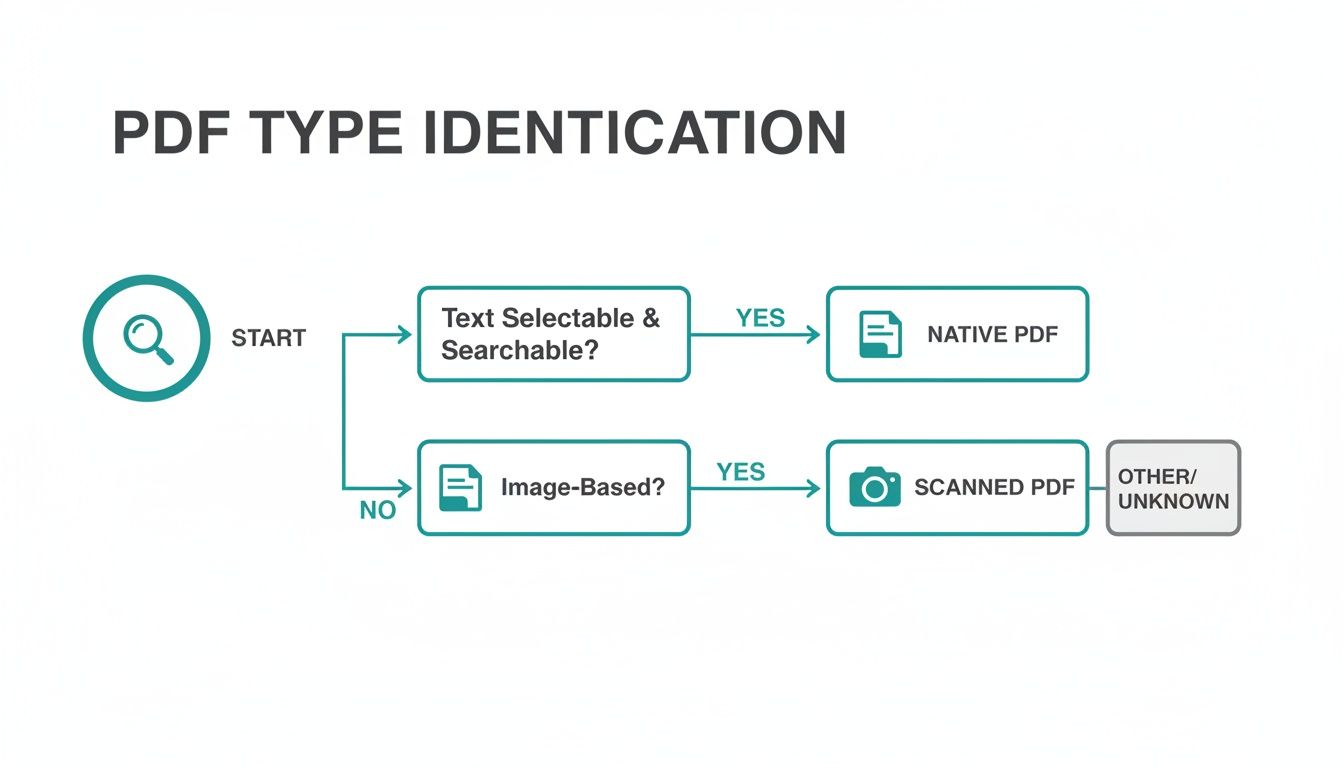
As you can see, figuring out if your PDF is native or scanned is the fork in the road that determines which path you'll need to take.
Free Online Converters
For many, a free online tool is the first port of call. You just upload your file, the website does its thing, and you get a text file back. It's simple, and it's free. But this convenience comes with a massive, often ignored, security risk.
When you upload a file to a free service, you're essentially handing over your data. You often have no real idea where it's going, who can see it, or how long it’s being stored. For a personal, non-sensitive document, maybe that's a risk you're willing to take. But for bank statements, client invoices, or supplier receipts? That's a serious vulnerability.
Uploading confidential financial data to an unsecured online converter is like leaving your company's financial records on a public park bench. The convenience is not worth the potential exposure of sensitive information.
Built-in Operating System Tools
Your computer's operating system likely has some basic tools for handling PDFs. On a Mac, for instance, Preview lets you select and copy text from a native PDF without any extra software. Windows offers similar, albeit limited, functionalities.
These built-in options are great for quick, one-off tasks. If you just need to grab a few sentences from a report, they work perfectly. Their limitations show up pretty quickly, though. They can't handle scanned documents because they have no OCR (Optical Character Recognition) capabilities, they often mangle complex layouts like tables, and they certainly don't offer any way to process files in bulk. They’re a handy tool for casual use, not a serious solution for business workflows.
Dedicated Desktop Software
When you need more power and security, dedicated desktop software is the traditional go-to. You install these applications directly on your computer, and they often come packed with robust features, including high-quality OCR and batch conversion options.
Because all the processing happens locally on your machine, desktop software gives you a huge security advantage over online tools. Your sensitive documents never leave your computer, which is absolutely crucial for any business handling confidential data.
The main drawback? Most of these tools are generalists. They’re built for all-purpose document conversion, not specifically for the structured data found in financial documents. This means you’ll likely spend a lot of time manually cleaning up the extracted text to get it into a usable format for your accounting software. Some advanced options, however, do more than just extract text; many now function as powerful PDF summarizer tools, adding extra value.
Specialised AI Platforms like Mintline
This brings us to the final and most advanced category: specialised, secure AI platforms built for a specific purpose. For any business drowning in financial paperwork, a tool like Mintline is designed from the ground up to solve their exact problems. It offers the best of every world: powerful OCR, seamless batch processing, and a security-first architecture.
What truly sets Mintline apart is its intelligence. Mintline doesn't just convert PDF to text; its AI has been trained to actually understand the context of financial data. It knows how to spot a vendor, an invoice number, a transaction date, and a total amount. This contextual understanding is the game-changer—it delivers structured, clean data, not just a messy wall of text.
Across the business world, especially in digitally advanced regions like the Netherlands, the shift towards specialised AI is accelerating. With 18.1 million Dutch internet users, the demand for smarter digital administration has never been higher. Research from GfK shows that AI platform usage in the Netherlands soared to a 48% monthly reach by June 2025, a massive jump from just 12% the year before. This trend highlights a clear move away from basic tools towards intelligent platforms that can extract specific, meaningful information—which is exactly what Mintline does for financial PDFs.
For any serious financial workflow, the choice becomes clear. Free tools are too risky, and built-in options are too basic. Mintline provides the accuracy, security, and efficiency that modern businesses need to stay competitive. To dig deeper, check out our detailed comparison of the best OCR software and see how these tools stack up.
How Mintline's OCR Technology Reads Your Scanned Documents
Ever snapped a picture of a receipt, or scanned an old bank statement? To your computer, that's just a flat image—a collection of pixels. You can see the words, but the machine can't. That’s where Optical Character Recognition (OCR) comes in.
Think of OCR as the brain that teaches your computer to read. It's the magic that turns a static picture of a document into usable, editable text. Without it, every scanned PDF would be a digital dead-end, impossible to analyse, copy, or plug into your accounting software. It's the crucial bridge between a crumpled piece of paper and clean, digital data.
This is exactly how Mintline can look at a photo of a receipt and instantly pull out the vendor's name, the date, and the total amount. It’s a sophisticated process that happens in seconds, saving you from the tedious chore of typing it all in yourself.
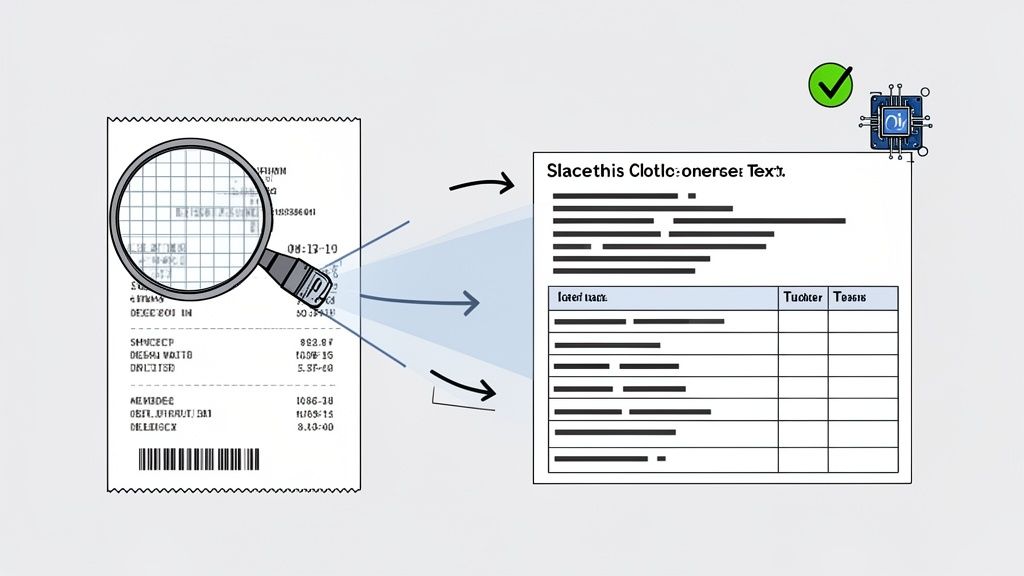
From Image Pixels to Structured Data
So, how does Mintline's OCR actually work? The journey from a scanned image to useful information isn't just one step. First, the software analyses the image to clean it up—a stage known as preprocessing. This might mean straightening a skewed document, getting rid of any visual ‘noise’ in the background, or sharpening the contrast so the text really pops.
Next is the core recognition phase. The OCR engine meticulously scans the cleaned-up image, breaking it down into lines, then words, and finally, individual characters. It then plays a high-speed matching game, comparing the shape of each character against a vast library of fonts and handwriting styles to find the best fit.
The final piece of the puzzle is post-processing. This is where Mintline's AI really flexes its muscles. It's not just about recognising letters; it's about understanding context. The AI uses language models to correct common recognition mistakes—like fixing "Payrnent" to "Payment". Crucially for financial documents, it also identifies the data's structure. This is how Mintline knows that the number next to the word "Total" is the final amount, or that a specific string of digits is a transaction date.
Overcoming Common OCR Hurdles
Of course, the real world is messy. Documents are rarely perfect, and older OCR systems would often get tripped up. Mintline’s AI-driven technology, however, is built to handle these challenges.
- Blurry or Low-Quality Images: We've all snapped a quick photo of a receipt in bad lighting. Older OCR might just give you gibberish. Mintline’s algorithms, on the other hand, are trained on millions of imperfect images. This helps them make intelligent guesses and reconstruct text from blurry sources with impressive accuracy.
- Complex Table Layouts: Bank statements and invoices are full of tables. A basic tool might just extract a jumbled wall of text, losing all context. Mintline's intelligent OCR system recognises the grid structure, preserving the link between, say, a transaction description and its corresponding debit or credit amount.
- Unusual Fonts and Handwriting: From funky logos on invoices to a handwritten note on a receipt, documents are full of varied text styles. Our AI-powered OCR uses machine learning to get smarter over time, constantly improving its ability to recognise new fonts and even decipher messy handwriting.
The goal of modern OCR isn't just to convert PDF to text; it's to turn a chaotic document into structured, reliable data. This intelligence is what separates Mintline from basic converters.
For someone using Mintline, this means you don't have to sweat the quality of every single scan. You can trust that the tech underneath is smart enough to handle the quirks of real-world financial documents. It turns what was once a frustrating, error-prone task into a smooth, automated workflow, building the trust needed to handle your most important financial information.
Getting It Right: Tips for Accurate and Secure Conversions with Mintline
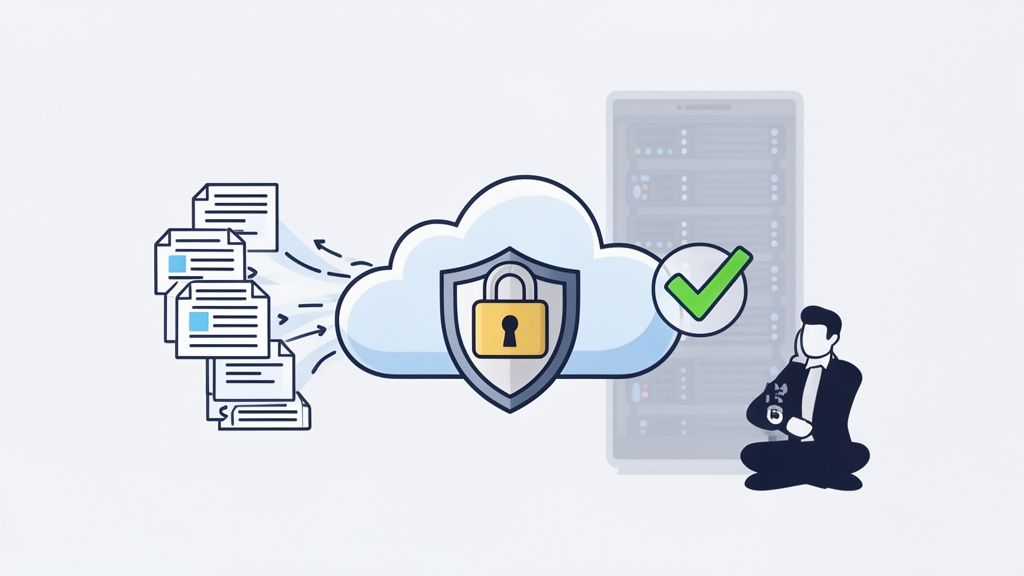
Getting text out of a PDF is one thing, but getting it right is another challenge entirely. For anyone handling important information, especially financial documents, the real priorities are ensuring the extracted text is 100% accurate and the whole process is buttoned-up secure. A single misplaced decimal or a data leak can cause absolute chaos.
This is where having a solid process with a trusted tool like Mintline comes in. A few best practices can dramatically improve the quality of your results and, more importantly, shield your sensitive data from risk.
Nailing the Accuracy of Your Conversion
I've learned this the hard way: the quality of your output is almost entirely dependent on the quality of your input. It's a simple rule, but it's the most critical one for any OCR job. If you want clean text, you need to give your conversion tool a clean document to work with.
A few practical tips can make a world of difference:
- High-Quality Scans are a Must: Whenever you can, scan documents at a resolution of at least 300 DPI (dots per inch). This gives the OCR engine far more detail to analyse, which cuts down on errors dramatically.
- Mind Your Lighting and Contrast: If you’re snapping a picture of a receipt with your phone, lay it on a flat, dark surface with good, even lighting. Shadows and glare are the enemy; they can easily obscure characters and confuse the software.
- Straighten Up: Documents that are scanned or photographed at an angle (a problem known as "skew") are tough for OCR to read. Most modern scanners and platforms like Mintline can automatically de-skew images, but starting with a straight document is always your best bet.
It's also worth thinking about what happens after the conversion, particularly for international business. For instance, successfully translating a PDF while preserving its original formatting is a crucial skill for maintaining the document's integrity. You don't want the context and structure to get lost in translation, as that's just as bad as character-level mistakes.
Putting Data Security First with Mintline
For anyone in finance, security isn't just a nice-to-have; it's the foundation of everything. When you convert PDF to text, you're often handling bank account details, transaction histories, or confidential client information. You absolutely have to know where that data is going and how it's being protected.
This is the biggest problem with most free online converters. Their business models often revolve around data, and their terms of service can be incredibly vague about how your files are stored, shared, or even used to train their AI models. For any professional, that level of risk is just not acceptable.
Entrusting sensitive financial documents to a free, unsecured online tool is a massive gamble. A secure-by-design platform isn't a preference; it's a professional responsibility to protect your company's and your clients' data.
A truly secure solution like Mintline is built from the ground up with trust and protection in mind. It’s not an afterthought; it’s the core of the service.
Here’s what our secure-by-design approach actually looks like in practice:
- End-to-End Encryption: Your data is protected both in transit and at rest using AES-256 encryption—the same standard trusted by banks and governments.
- Secure, Regional Hosting: All data is stored on reliable, EU-based AWS servers. This ensures compliance with strict data privacy laws like GDPR and means your information never leaves a secure, controlled environment.
- A Strict No-Sharing Policy: Your data is yours and yours alone. Mintline operates under a strict policy of never sharing or selling user data to third parties. Full stop.
In the end, choosing Mintline to convert PDF to text is about much more than just speed. It's a decision that directly impacts your data's accuracy and your business's security. By focusing on high-quality inputs and working with a platform that puts protection first, you can build a workflow that's not just fast, but fundamentally trustworthy.
Frequently Asked Questions About PDF to Text Conversion
When you're trying to pull text from a PDF, especially something as important as an invoice or bank statement, a few questions always seem to pop up. Getting these sorted is the key to building a workflow that's both efficient and secure. Here’s how Mintline addresses the most common queries.
What’s the Safest Way to Convert a PDF Bank Statement to Text?
When it comes to sensitive financial documents, the best approach is always a secure, AI-powered platform built specifically for the task, like Mintline. I know the free online tools look tempting, but they can be a real minefield for privacy, potentially leaving your financial data exposed.
An AI tool designed for finance isn't just a generic converter. Mintline's AI has been trained on thousands of bank statement layouts, so it understands how to read complex tables accurately. This means you get clean, structured data without having to worry about your information being compromised. Everything stays private and encrypted.
Can I Process a Whole Batch of PDFs at Once?
Absolutely. This is called batch processing, and for any business, it’s a game-changer. Forget the soul-destroying task of converting files one by one. Modern platforms like Mintline are designed to handle documents in bulk.
You can just drag and drop an entire folder of PDF statements or receipts, and the system gets to work. It processes everything in the background, pulls out the text, and organises the data for you. For anyone in accounting, this turns hours of manual drudgery into a simple task that’s over in minutes.
How Accurate is OCR on Financial Documents?
These days, modern AI-driven OCR is incredibly precise. On a clear, high-quality document, Mintline's platform can achieve accuracy rates north of 98%. With financial data, that level of precision isn't just nice to have—it's essential for avoiding costly mistakes.
But the best systems do more than just read letters and numbers. Mintline uses sophisticated machine learning to recognise different statement formats, identify a vendor from their logo, and correctly interpret currency symbols. This built-in intelligence means you spend far less time on manual checks and corrections, giving you data you can actually trust.
Accuracy is non-negotiable in finance. Mintline’s OCR doesn’t just see letters and numbers; it understands their context within a financial document, which is what delivers truly dependable results.
Does Converting to Text Keep the Original Formatting?
This is a really common question, and the answer isn't a simple yes or no. A basic text conversion will usually strip out all the visual flair—fonts, colours, and the layout—leaving you with plain, raw text. For a simple letter or report, that's often all you need.
But for financial records, it's the structural formatting that matters, not the aesthetics. Advanced platforms like Mintline are built to preserve this crucial structure. The AI knows the relationship between dates, descriptions, and amounts in a transaction. It maintains that context, which is far more valuable for bookkeeping than keeping the original font. It makes sure the data stays meaningful and is ready for your accounting software.
Ready to stop wasting hours on manual data entry? With Mintline, you can drag and drop your PDF bank statements and receipts, and let our AI automatically extract and match every transaction. Experience a faster, more accurate financial workflow. Explore our features and start for free today.