
A Finance Team's Guide to Using a Text Reader Image for Receipts
Transform your finance workflow with a text reader image. Learn how OCR automates receipt processing and eliminates manual data entry for good. Read our guide.
That shoebox overflowing with faded receipts isn't just an eyesore; it's a hidden tax on your company's time and focus. A text reader image tool, which you'll often hear called Optical Character Recognition or OCR, is the fix. It simply turns pictures of receipts and invoices into digital data you can actually use, cutting out endless hours of mind-numbing data entry. Mintline's platform is designed to make this process seamless for finance teams.
Why Sticking to Manual Receipt Handling Is Holding You Back
Let's be real—the old way of handling expenses is completely broken. For any business trying to grow, every minute someone spends typing numbers from a crumpled receipt is a minute they're not spending on sales, strategy, or looking after clients. This is far more than just an admin headache; it’s a serious drain on your resources.
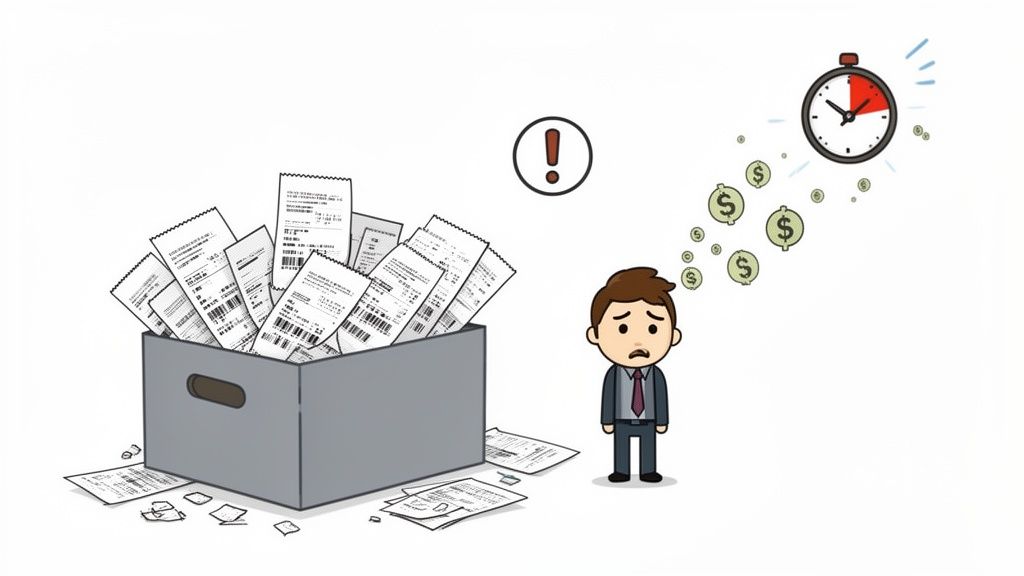
The true cost of manual data entry is often invisible, but it adds up quickly. Picture a startup scrambling to close the books. One person could easily burn days just matching bank transactions to a mountain of invoices and receipts. Not only is this process painfully slow, but it’s a minefield for human error. A single misplaced decimal or a missed invoice can create inaccurate financial reports, put you at risk during an audit, and lead you to make business decisions based on faulty numbers.
The Sneaky Costs of Doing Things by Hand
The trouble with manual expense management goes way beyond just wasted time. It triggers a domino effect of problems that can seriously slow down growth and open the door to unnecessary risk.
- Productivity Down the Drain: Research has shown that manual data entry can cost businesses hundreds of hours every single year. That’s valuable time your team should be spending on activities that actually bring in revenue.
- Costly Financial Mistakes: Nobody's perfect. Even your most careful employee can make a mistake, and a single typo can throw off your entire budget, complicate tax filings, and damage your financial credibility.
- No Real-Time Visibility: When all your spending data is trapped on paper, you have no way to get a clear, current picture of where your money is going. This makes it nearly impossible to plan effectively or make quick, informed decisions.
This is exactly where technology like a text reader image system comes in and changes everything. For a deeper dive into the pitfalls of old-school methods, you can learn more about the challenges of manual financial processing.
By automating how you pull data from documents, you're not just saving time. You're building a reliable, accurate, and audit-ready financial foundation for your business.
This is the exact problem platforms like Mintline were built to solve. It doesn't just offer OCR as a standalone feature; it builds it right into a complete, automated workflow. Mintline reads the data from your receipts, automatically matches it to the right bank transaction, and gets it ready for your accounting software. It turns a chaotic manual chore into a smooth, efficient process, giving you back your most precious asset: your time.
Choosing the Right OCR Tool for Financial Documents
Picking the right text reader image tool isn't just about ticking off a list of features. It’s about finding a solution that genuinely understands the unique chaos of financial documents. A standard OCR scanner might do a decent job of pulling text from a clean book page, but throw it a crumpled receipt or a multi-page invoice, and it often falls flat. For a finance team, a few misinterpreted numbers aren't just a nuisance—they can lead to serious errors.
The real magic happens after the text is pulled. Basic tools just give you a jumble of characters. Specialised platforms like Mintline, on the other hand, are built with financial context in mind. They don't just see "19,95"; they know it's the total amount, connect it to the vendor "Café De Vrijdag," and recognise "14-10-2025" as the date of the transaction. This level of understanding is what turns a simple scanner into a powerful automation asset for your business.
Accuracy and Reliability for Financial Records
When you're looking at different OCR tools, accuracy should be your top priority. Financial documents are a messy bunch—think faded thermal paper, complex PDF invoices, and receipts that have been through the wringer. A tool that proudly claims 99% accuracy on a pristine, typed page might completely stumble when faced with the kind of documents your team handles every single day.
That’s why Mintline's solution has been specifically trained on financial layouts. This means the AI behind our text reader image function has already seen millions of receipts and invoices, learning to spot the important details no matter how weird the format is. For a closer look at how these systems are built, check out our guide on the fundamentals of a text from image reader for business.
The real aim isn't just to get text off a page; it's to pull out structured, reliable data. A good tool drastically cuts down on manual corrections, making sure the information heading into your accounting system is right from the very beginning.
When choosing a tool, it's helpful to see a direct comparison of what you get with a generic solution versus a platform designed for finance, like Mintline.
Comparing OCR Tool Features for Financial Documents
| Feature | Generic OCR Tool | Mintline (Specialised Platform) |
|---|---|---|
| Data Extraction | Extracts raw, unstructured text. | Identifies and structures key fields like vendor, date, total, and VAT. |
| Document Training | Trained on general documents (books, letters). | Specifically trained on millions of invoices, receipts, and bank statements. |
| Accuracy on Messy Docs | Often struggles with crumpled paper, poor lighting, and complex layouts. | High accuracy on real-world financial documents, even with imperfections. |
| Integration | Limited or requires custom API work. | Seamless, one-click integrations with major accounting software (Xero, etc.). |
| Security | Varies widely; may lack business-grade protocols. | Enterprise-grade security with AES-256 encryption and EU data residency. |
| Workflow Automation | Typically a standalone tool requiring manual data entry afterwards. | Part of an end-to-end automated workflow, from upload to accounting entry. |
This comparison makes it clear: while a generic tool might seem sufficient, a specialised platform like Mintline is built to solve the specific challenges finance teams face, saving time and preventing costly mistakes.
Security and Integration Are Non-Negotiable
Beyond getting the numbers right, security is absolutely critical. You're dealing with sensitive financial information, so the platform you choose has to be locked down tight. Some standalone apps might store your data on unsecured servers or have vague privacy policies, which is a risk you can't afford to take. A business-grade solution like Mintline is built with security as a core principle.
Here are the must-haves that Mintline delivers:
- Data Encryption: We use strong encryption, AES-256, for your data both in transit and at rest.
- Data Residency: To comply with regulations like GDPR, knowing where your data lives is essential. Mintline stores all client data on secure servers based in the EU.
- Integration Capabilities: A fantastic text reader is useless if it just creates another information silo. Mintline plugs directly into your existing financial systems, letting you push data effortlessly to accounting software like Xero or QuickBooks.
In the end, choosing the right tool means looking past the basic OCR function. You need a complete platform like Mintline that delivers on accuracy, guarantees security, and slots perfectly into your daily workflows. This is how a simple text reader evolves from a handy gadget into a central piece of your automated financial operations.
How to Prepare Images for Maximum OCR Accuracy
Great output always starts with great input. When you're using an OCR system like Mintline's to pull text from an image, the quality of that initial scan or photo is easily the biggest factor in getting accurate results. Taking a few extra seconds to get this right can save you minutes of manual corrections later.
Think of it this way: our AI can be incredibly powerful, but it can’t see through a dark shadow or decipher a blurry word any better than you can. Your job is to give the OCR a clean, clear view of the document. This is especially true for the kind of tricky documents finance teams see every day, like those long, faded thermal receipts or complex PDF invoices with tiny fine print.
Optimising Your Scans and Photos
Getting a high-quality image isn't difficult, but it does mean paying attention to a few details. Whether you're using a proper flatbed scanner or just the camera on your phone, consistency is key.
A common mistake is simply rushing. We’ve all done it: quickly snapping a photo of a receipt crumpled in one hand under dim restaurant lighting. That’s a recipe for disaster. Mintline's software will inevitably struggle with the creases, shadows, and blur, likely misreading crucial figures like the total amount or VAT.
Instead, just take a moment. Smooth the document out on a flat, contrasting surface—a dark table is perfect for a white receipt. Make sure the lighting is even and direct, and watch out for any harsh shadows cast by your hands or your phone.
Practical Tips for Perfect Images
To get every image ready for the best possible OCR performance, here are a few practical guidelines to follow. These apply whether you're capturing a one-off expense on the go or scanning a large batch of supplier invoices back at the office.
- Mind the Lighting: Good, even light is your best friend. Avoid bright spots and dark shadows. Natural daylight near a window is often ideal, but if you're using a lamp, make sure it illuminates the whole document without creating glare.
- Get the Angle Right: Always position your camera directly above the document, looking straight down. Capturing it from an angle skews the perspective and distorts the text, making it much harder for the software to read correctly. Think of it as a bird's-eye view.
- Focus on Resolution: A blurry image is an unreadable image. Modern phone cameras are plenty powerful, but you have to give them a second to focus properly before you snap the picture. If you're using a scanner, 300 DPI (dots per inch) is the gold standard for reliable text recognition.
- Frame the Entire Document: Don't chop off the edges or corners. Make sure the whole receipt or invoice is visible in the shot, as important details like invoice numbers or dates are often tucked away near the borders.
Taking a moment to capture a good image is a small investment that pays off big time. A clean source image allows a powerful tool like Mintline to deliver near-perfect data extraction, turning a tedious job into a quick, automated step.
Ultimately, preparing your documents the right way ensures your entire workflow runs without a hitch. For a deeper dive into these techniques, check out our complete guide on how to scan text from image files. By mastering these simple steps, you set your OCR tool up for success, giving you clean, reliable data from the very beginning.
From Messy Image to Clean Data
Once you have a good-quality scan or photo, the real work begins. This is where you move from just having a picture of a receipt to having structured, usable data in your accounting system. A basic text reader image tool can pull characters off a page, but for finance, that’s not nearly enough. You need a tool that understands what it’s reading.
This is where sophisticated platforms like Mintline really come into their own. Instead of giving you a block of raw text, its AI is trained to understand the layout of financial documents. It's seen millions of invoices and receipts, so it knows exactly where to find the vendor's name, the date, the total amount, and the VAT. It’s the difference between a simple scanner and a smart financial assistant. It doesn't just read the numbers; it understands what they represent.
Connecting the Dots: From Extraction to Your Bank Account
The most powerful part of the Mintline process is what happens next. Our system doesn’t just stop after pulling the text from the image. It takes that fresh, structured data and immediately tries to match it with your actual bank transactions.
Let's say you upload a receipt from a business lunch. Mintline’s OCR function identifies the key details:
- Vendor: "The Corner Bistro"
- Date: "14-10-2025"
- Total: "€45.80"
At the same time, the system is looking at your connected bank feed. It spots an outgoing payment of €45.80 on October 14th and flags it as a likely match. With one click, you can link the digital receipt directly to its corresponding bank line. This simple step completely gets rid of the tedious, manual grind of cross-checking spreadsheets and bank statements. It's no surprise that this kind of intelligent text mining is catching on. In the Netherlands, for instance, 22.7% of businesses were using AI in 2024, and the use of text mining specifically shot up by two and a half times in a single year. You can dive deeper into these AI adoption trends from the CBS AI Monitor 2024.
The real aim here isn't just to extract data, but to intelligently connect it. When you automatically link every receipt to a transaction, you build a complete, verifiable record for every single expense. Your books become audit-ready by default.
This automated matching is what turns AI from an abstract idea into a practical tool you’ll use every day. Of course, once you have this data extracted and organised, protecting it is critical. Robust data security and compliance practices are essential to safeguard sensitive financial information and stay on the right side of regulations.
You're Still the Boss: The Simple Review Workflow
Automation is a massive time-saver, but when it comes to financial records, human oversight is absolutely essential. A good system should always keep you in the driver's seat.
This is why Mintline presents all its AI-powered suggestions on a simple, clean dashboard. You get a clear list of proposed matches between receipts and bank lines, ready for a quick confirmation.
Most of the time, it's just a matter of clicking "confirm." But what if the AI isn't certain? Maybe the date on a receipt is smudged, or the format is unusual. In those cases, the system flags the item for you to take a quick look. This "human-in-the-loop" design gives you the best of both worlds: the incredible speed of automation backed by the certainty of your final approval.
It makes AI feel less like a black box and more like a capable assistant doing the grunt work. You get the final say, ensuring 100% accuracy and giving you total confidence that your books are perfect.
Building a Fully Automated Financial Workflow
The real magic of using an image-to-text reader isn't just about pulling data from a single document. It’s about creating an entire financial workflow that practically runs itself. This is where you move beyond simple data extraction and connect all the dots, transforming a series of separate chores into one smooth, automated system. That's the ultimate goal that Mintline helps you achieve: a hands-off process that frees you up to focus on growing the business.
It all starts by making OCR part of a much bigger picture. A truly automated system like Mintline links up with your bank accounts, uses the data it extracts to automatically flag any unmatched documents, and then packages everything neatly for your accounting software. Instead of you chasing down missing receipts, the system does the heavy lifting, creating a perfectly organised, audit-ready trail as it goes.
This is a simple look at how that data flows from the moment a document is uploaded to the final verification.
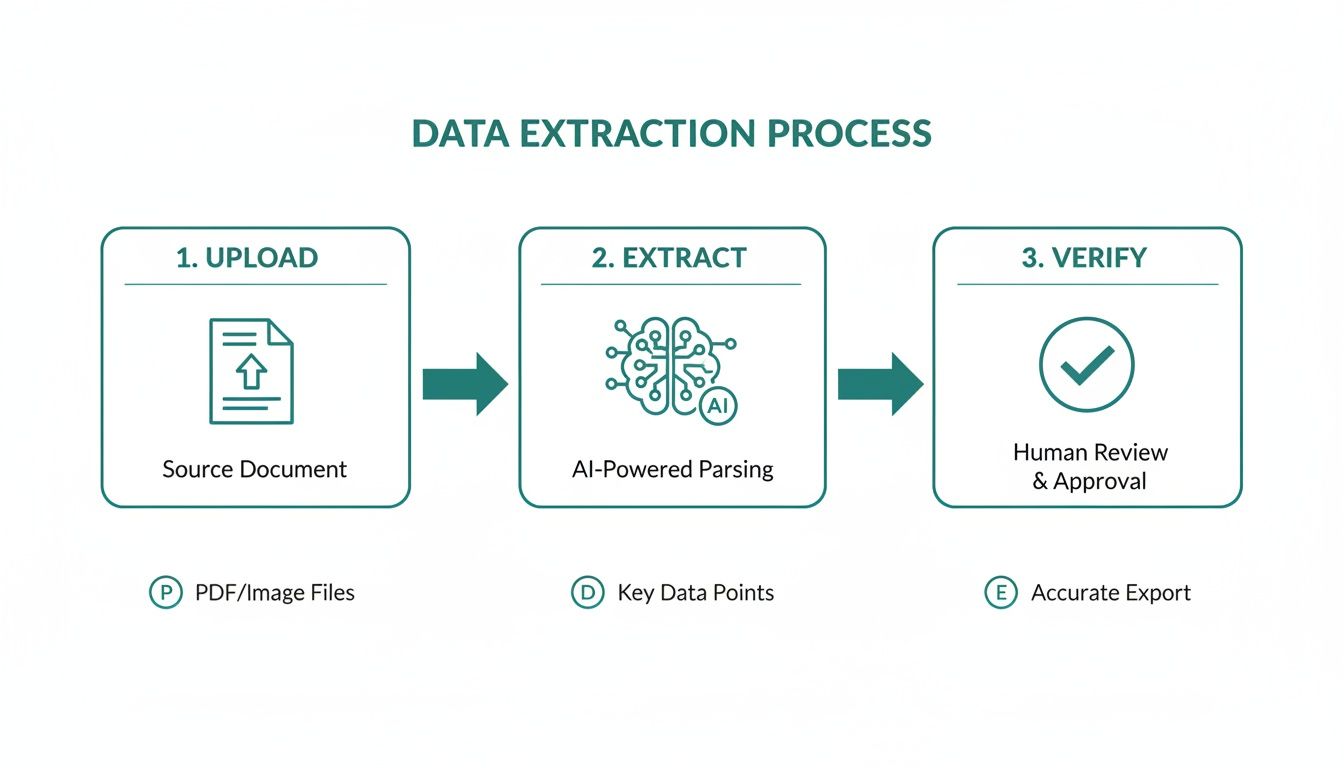
As you can see, automation cuts out the manual steps at every stage, which dramatically speeds up the whole cycle.
Real-Time Financial Visibility
One of the best outcomes of building this kind of connected system is getting a live, bird's-eye view of your company's financial health. When every transaction is automatically tied to its document, that frustrating delay between spending money and seeing it in your books disappears. With Mintline, you no longer have to wait for month-end to get a clear picture of your cash flow.
With a real-time dashboard, you can see exactly where your money is going, moment by moment. This allows for quicker, more informed decision-making and helps you close the books in days, not weeks.
This kind of sophisticated information extraction is quickly becoming the norm. In the Netherlands, for example, consumer AI use is exploding, going way beyond just writing text to handling complex tasks like pulling data from images. A GfK study found that the monthly reach of AI platforms among people aged 13+ shot up from 12% to 48% in just one year. People are starting to treat AI like a new kind of search engine.
This trend mirrors exactly what we see with Mintline's users. Freelancers and founders now count on AI text readers to accurately parse every last detail from their receipts and invoices.
Exporting Clean Data for Your Records
The final piece of the puzzle is getting all that clean, verified data into your accounting software. Mintline's automated workflow ensures the information is correctly categorised and formatted, ready for a one-click import. This gets rid of that last, and often most tedious, step of manual data entry.
You can learn more about how this works in our guide to automatic document processing. Ultimately, the whole point is to create a seamless flow of information that guarantees your financial records are always accurate, organised, and completely up to date.
Common Questions About OCR for Finance
When you're thinking about bringing a new piece of tech into your finance workflow, it’s only natural to have a few questions. And when that technology touches your company's most sensitive financial data, those questions become even more critical. You've seen how a text reader image system can work, but you're right to be concerned about security, accuracy, and how it all fits together.
Let’s get straight to it and tackle the questions we hear most often from finance teams considering Mintline. The goal here isn't just to scan paper, but to build an automated system you can actually trust with your financial records.
How Secure Is Uploading Our Company Financials?
For any finance professional, this is the first and most important question. Security can't be an afterthought—it has to be baked in from the start. Top-tier platforms like Mintline are built on a foundation of robust security measures to protect your data at every single step.
Think of it like this: from the moment you upload a document, it's shielded with AES-256 encryption, both on its way to the server (in transit) and while it’s stored (at rest). To meet strict privacy regulations like GDPR, it’s also crucial to know where your data is physically located. Mintline, for instance, keeps all client information on secure, EU-based servers. We also have a strict policy against sharing your data with any third parties; it's used for one thing and one thing only: processing your documents.
What Is the Real Accuracy for Handwritten Receipts?
This is where reality meets the hype. While AI has made huge leaps, OCR for handwriting can still be a mixed bag. And in finance, where a misplaced decimal can cause chaos, you need precision. Mintline's platform can hit 95%+ accuracy on standard printed or typed text, which thankfully covers most of the invoices and receipts you'll encounter.
But what about those scribbled notes on a lunch receipt? A smart system like Mintline handles this pragmatically. It will pull all the printed data it can identify with high confidence, then simply flag the document for a quick human check. This means you aren’t typing everything from scratch, but you still get a human to give the final nod, ensuring you maintain 100% accuracy where it counts.
The best systems blend automation with human oversight. They handle the bulk of the work flawlessly and make it easy for you to verify the exceptions, giving you the perfect mix of speed and control.
Can This System Handle Foreign Currencies and Languages?
For any company doing business across borders, this isn't a "nice-to-have"—it's a must-have. A basic text reader image tool might stumble here, but a platform built for finance won't.
This is where a truly AI-powered system shows its strength. A platform like Mintline is designed from day one to be multilingual and multi-currency. It can automatically spot different currency symbols (€, $, £) and correctly parse various date formats (like DD/MM/YYYY vs. MM/DD/YYYY) without you having to lift a finger. Before you choose any tool, make sure to confirm it has this capability, otherwise, you'll be creating more manual work for yourself down the line.
How Does This Integrate with My Accounting Software?
Integration is what makes OCR a game-changer. Without it, you’re just moving a manual data entry task from one part of your day to another. The whole point is to close the loop and get that data into your books without touching the keyboard.
A purpose-built platform like Mintline does more than just rip raw text from a page. It intelligently structures the data—vendor name, date, total, VAT—into a format your accounting system can understand. Once you’ve approved the matched transactions, you can either export a clean, formatted file (like a CSV) or use a direct integration to push everything straight into software like Xero or QuickBooks. This final step is what makes the entire process worth it, leaving your books accurate and always up to date.
Ready to stop chasing receipts and automate your financial workflow? With Mintline, you can link every bank transaction to its document automatically, close your books faster, and keep everything perfectly organised. Try Mintline for free and see how it works.